
Character consistency
Short-Form Drama Character Sheet Guide: Multi-Angle References and Style Anchors
Build multi-angle character sheets and master style prompts to prevent facial drift across AI short drama shots on the Say Action canvas.
On this page
- Why Character Sheets Are Essential for Short-Form Drama
- Building a Standard Four-Angle Character Sheet
- Anchoring Overall Visual Tone with Master Style Prompts
- Connecting Character Nodes to Storyboard Rows in Say Action
- Human Quality Control and the Realistic Limits of AI Consistency
- Connect your own API channels and third-party relays
Why Character Sheets Are Essential for Short-Form Drama
This article was written by the Say Action team. The recommendations reflect our production workflow experience connecting scripts, storyboards, character reference nodes, and shot-by-shot video, not an independent lab benchmark. In AI-assisted short drama production, the single most persistent bottleneck is facial and anatomical drift—often described as identity deformation—between consecutive shots. Diffusion-based video generation models do not inherently retain visual context from prior generations; each new prompt starts fresh from stochastic noise. Relying solely on textual descriptions such as "a 28-year-old Korean male lead, parted dark hair, navy wool coat" almost guarantees that the protagonist appears to be played by different actors across close-ups and wide shots, instantly breaking viewer immersion.
The structural solution is establishing concrete pixel anchors prior to generation rather than relying on descriptive text alone. Much like live-action pre-production requires casting, hair styling, and costume fittings before cameras roll, an AI short series demands a standardized Character Sheet. A character sheet comprises high-resolution reference images capturing the actor's facial structure, proportions, distinctive expressions, and default wardrobe from multiple angles, providing an indisputable visual ground truth for both AI models and human editors.
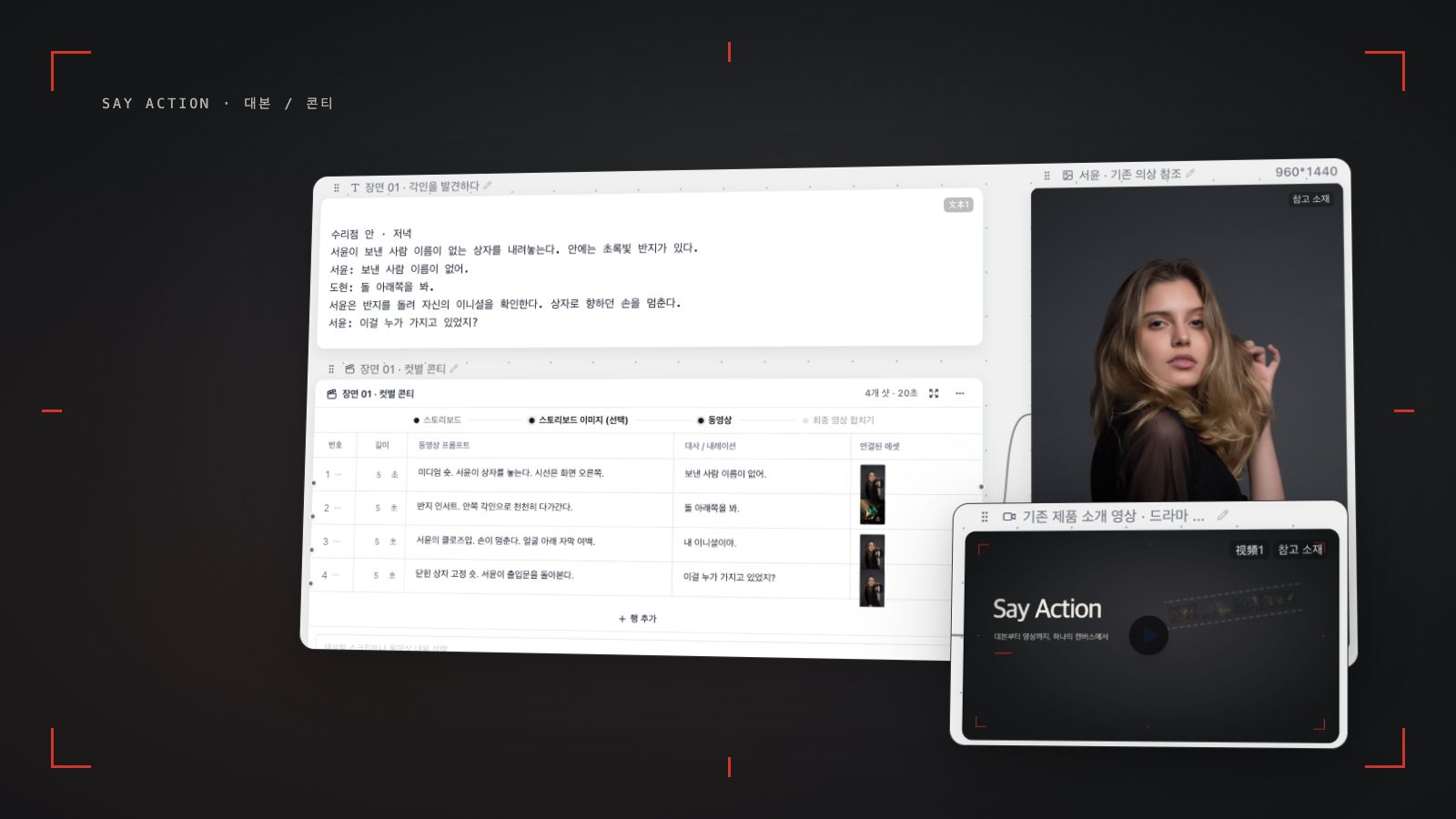
In vertical short dramas where 10 to 14 rapid-fire shots unfold across a tight 60 to 90-second episode, a single inconsistent shot threatens the continuity of the entire scene, driving up costly reshoots. Inside the Say Action infinite canvas, creative teams position dedicated character reference nodes right from the script breakdown phase and wire them directly into individual storyboard rows. This architectural approach suppresses random visual drift and brings industrial rigor to multi-shot character consistency.
Building a Standard Four-Angle Character Sheet
Constructing an effective character sheet requires more than collecting random portrait photos; creators must generate a coherent set of four standard reference angles capable of anchoring the subject in 3D-like space. A single front-facing portrait is insufficient for side-profile dialogue exchanges or dynamic over-the-shoulder perspectives. Within Say Action, creators leverage Nano Banana or high-fidelity image nodes under neutral studio lighting against solid neutral backgrounds to systematically render and curate four foundational angles for each protagonist.
The first image is the Front View (0°) baseline. This shot defines core facial proportions: bilateral symmetry, pupillary distance, bridge height, and lip contour. It should be framed at eye level with hair styled neatly away from key facial contours. The second is the Three-Quarter View (45°). As the workhorse angle supporting the majority of dramatic dialogue coverage—including medium shots and over-the-shoulder framing—it reveals cheekbone definition, jawline taper, and volumetric hair depth.
The third is the Side Profile (90°) reference. By clearly articulating the nasal bridge, chin projection, and ear placement, this view prevents structural cranial warping when a character turns rapidly or speaks in profile. The fourth is the Emotional Close-Up. Beyond a neutral expression, this reference captures a signature psychological mood—such as a focused glare, a confident smirk, or tense apprehension—calibrating the model's range of micro-expressions during heightened dramatic beats.
To maximize reproducibility across these reference images, prompts must follow a rigorous structural syntax. For instance: "Studio portrait of a 28-year-old Korean male actor, sharp jawline, neat parted black hair, wearing a structured charcoal gray blazer, neutral facial expression, clean white studio background, 85mm lens, soft diffuse lighting, photorealistic, ultra-detailed skin texture". While locking lighting, wardrobe, and camera parameters, swap only the angle tokens ("front view", "three-quarter 45-degree angle view", "side profile 90-degree view") to produce four pristine, mutually aligned master images.
Anchoring Overall Visual Tone with Master Style Prompts
Even with calibrated character sheet imagery, erratic video prompting can introduce mismatched lighting, color casts, and optical distortions that make the character feel disconnected from their environment. To guarantee cohesive atmosphere across an episode, creators design a shared Master Style prompt anchor. Acting like a digital show LUT and cinematography package, the Master Style block establishes uniform lighting physics, lens choices, and film grain across all scene prompts.
A robust Master Style block spans four critical pillars: (1) Character Identifier and Core Anatomy (e.g., Character Jin-woo: 28yo Korean male, sharp features, side-parted dark hair); (2) Locked Wardrobe Details (e.g., wearing signature navy cashmere overcoat over white shirt); (3) Cinematic Lighting Scheme (e.g., cinematic cold natural window light, subtle fill light, shallow depth of field); (4) Lens and Surface Texture (e.g., anamorphic 50mm lens look, 35mm film grain, 8k raw photo aesthetic, no hyper-stylized CGI distortion). This standardized string is systematically appended to every video node prompt across the storyboard.
Balancing prompt token weight against specific model behaviors is equally critical. When routing shots to Seedance 2.5, which excels at physical reference integration and first/last frame interpolation, the Master Style can focus primarily on atmospheric lighting and texture. Conversely, when dispatching tasks to MiniMax or Kling, whose dynamic motion physics can be sensitive to verbose descriptors, keep prompt syntax concise and prioritize active verbs over redundant modifiers. Say Action displays model-specific input requirements directly on each canvas node to streamline configuration.
Connecting Character Nodes to Storyboard Rows in Say Action
Managing dozens of prompt strings and image assets without visual clutter requires an organized spatial workspace. In the Say Action infinite canvas, creators organize their four validated character sheet images into a dedicated Character Reference Node positioned prominently alongside the main workflow. Rather than acting as a static moodboard, this node functions as a live data dependency that feeds facial embeddings into downstream shot generation tasks.
Next, creators connect the character reference node to specific rows within the storyboard table generated from the script. Whenever a character appears in a given shot (such as Shot 1 Establishing Close-up or Shot 3 Dialogue Coverage), drag a connector from the reference node or assign the character tag in the row settings. For complex multi-character dialogues, split the scene into alternating singles (shot/reverse shot) and bind each actor's node individually to prevent diffusion feature-averaging and face-blending errors.
Once references are bound, instantiate video generation nodes from the storyboard rows. Standard practice involves rendering one or two representative close-ups first to verify consistency against the character sheet before executing full-batch renders. If a specific shot exhibits awkward motion or slight drift, isolate that node, refine its prompt or seed, and regenerate only that shot while preserving the rest of the timeline. For platform billing and provider boundaries, check the current copy: Credits are estimated from channel pricing; final deduction follows the price tiers configured in the admin backend. Per-second video billing is pre-authorized by requested seconds; if upstream output exceeds the request, a small concession difference may occur. The service fee covers the workspace, not model usage. Provider API charges are separate.
Human Quality Control and the Realistic Limits of AI Consistency
Professional AI filmmaking requires acknowledging current technological realities: as of 2026, no commercial video model provides an infallible 100% face-locking guarantee or zero-defect simulation. Character sheets and master style anchors drastically curtail visual drift, but intense camera pans, extreme lighting shifts, or intricate physical interactions can still introduce subtle warping or artifacting. Thorough Human Quality Control (QC) remains an indispensable stage before editorial handoff.
Before approving clips for assembly, editors should audit each shot against four practical QC criteria: (1) Facial Geometry and Gaze Direction: verify eye alignment and sightline axis toward the off-screen partner; (2) Costume and Hair Continuity: check partings, collar structure, and button accents against adjacent takes; (3) Lighting Physics: confirm that directional keylights and fill shadows match the room geometry; (4) Extremities and Hand Props: inspect fingers holding phones or cups for anatomical deformities.
When an anomaly is caught during QC, there is no need to scrap the entire scene; simply modify the seed or polish the first-frame anchor on that isolated node and re-render. Say Action provides upfront credit estimates prior to task submission, and automatic refunds apply when backend provider errors occur. See available models, resolutions, and estimated credits on the creation page. The final credit charge is shown before you submit. When the upstream explicitly reports failure, reserved credits are refunded; tasks with unclear network status stay pending review to avoid double settlement. BYOK supports a custom API endpoint, model key and headers. For OneAPI, NewAPI or another relay, select the OpenAI, Gemini or Claude protocol that matches its actual API, then check model IDs and image/video endpoint support. Not every relay or private protocol works automatically. BYOK model calls have no platform model markup or platform generation-credit deduction; workspace access and provider usage are still billed separately.
Connect your own API channels and third-party relays
In model-channel settings, enter the Base URL and API key, then configure the protocol, model IDs and required headers from your provider's documentation. Check the image and video modes you need before generating. Paths, resolutions and first/last-frame inputs depend on the connected channel. An adaptation request for an unsupported channel is not a compatibility guarantee.
BYOK supports a custom API endpoint, model key and headers. For OneAPI, NewAPI or another relay, select the OpenAI, Gemini or Claude protocol that matches its actual API, then check model IDs and image/video endpoint support. Not every relay or private protocol works automatically. BYOK model calls have no platform model markup or platform generation-credit deduction; workspace access and provider usage are still billed separately.
Connect only trusted providers and use HTTPS in production. Custom requests are forwarded through the authenticated backend; required prompts, reference assets and credentials take part in the request. Never put API keys, passwords or secret-bearing headers in public canvases, screenshots or support requests.
Frequently asked questions
How many images should be included in a character sheet?
A set of 3 to 4 images is ideal: front view (0°), three-quarter view (45°), profile (90°), and an emotional close-up. Using only 1 or 2 images often causes facial deformation during camera rotation, while supplying more than 7 or 8 images dilutes prompt attention tokens and can trigger computational interference.
Does binding a character sheet to every shot slow down generation?
Passing reference image data into model adapters adds a few seconds of preprocessing compared to pure text prompting. However, compared to the heavy iteration cost of regenerating drifting faces across entire sequences, this practice significantly reduces overall turnaround time and unnecessary credit waste.
How should costume or hairstyle changes mid-story be handled?
Instead of overwriting your primary character reference node, create a secondary character node on the canvas (for example, "Evening Gala Suit" or "Casual Wardrobe"). Then bind that secondary node only to the storyboard rows where the scene takes place, preserving facial structure while updating wardrobe continuity.
What happens to credits when a generation task fails?
When the upstream explicitly reports failure, reserved credits are refunded; tasks with unclear network status stay pending review to avoid double settlement.
Can I connect OneAPI, NewAPI and custom headers?
BYOK supports a custom API endpoint, model key and headers. For OneAPI, NewAPI or another relay, select the OpenAI, Gemini or Claude protocol that matches its actual API, then check model IDs and image/video endpoint support. Not every relay or private protocol works automatically. BYOK model calls have no platform model markup or platform generation-credit deduction; workspace access and provider usage are still billed separately.