
Budget & Production
Budgeting an AI Microseries: How to Calculate Credits, Video Models, and BYOK Costs
Learn how to calculate the realistic budget of a vertical AI microseries: per-shot credit formulas, 768P preview optimization, and when to activate BYOK in Say Action.
On this page
- The Real Cost of a Vertical Microseries: Looking Past the "Free AI Video" Myth
- Credit Breakdown: What Every Shot Costs on the Canvas
- The Previsualization Strategy: 768P Drafts and 2K Master Rendering
- When to Activate BYOK (Bring Your Own Key)
- Failure Protection and Transparent Credit Policies
- Connect your own API channels and third-party relays
The Real Cost of a Vertical Microseries: Looking Past the "Free AI Video" Myth
This guide was authored by the Say Action team to provide a transparent, sustainable cost framework for creators producing vertical episodic drama with artificial intelligence. In filmmaker communities and online video forums, creators frequently search for queries like "AI microseries budget", "how much does it cost to make an AI series", or "calculating AI video credits". However, promises of turnkey "free AI video" quickly fall apart in commercial production: a 30 to 50 episode vertical series (featuring 60 to 90-second episodes and 10 to 12 shots per episode) requires generating and organizing 300 to 600 distinct video clips. Relying on trial allowances or closed platforms with strict monthly credit resets leaves creators vulnerable to mid-season budget lockouts and runaway costs.
Financing an AI production without unexpected expense requires replacing vague guesswork with an industrial unit-cost model per shot. An episode's real production cost is not an arbitrary flat subscription fee, but the product of three operational factors: the total number of narrative shots, draft iteration expenses, and high-fidelity final renders. Creators who attempt to generate every take directly in 2K through blind trial and error inevitably watch their credits evaporate at the first sign of visual morphing or unnatural motion. By contrast, a disciplined production separates expenditure into layers: zero-cost script development, low-cost keyframe staging, fast low-resolution previews, and master 2K rendering reserved strictly for approved cut lines.
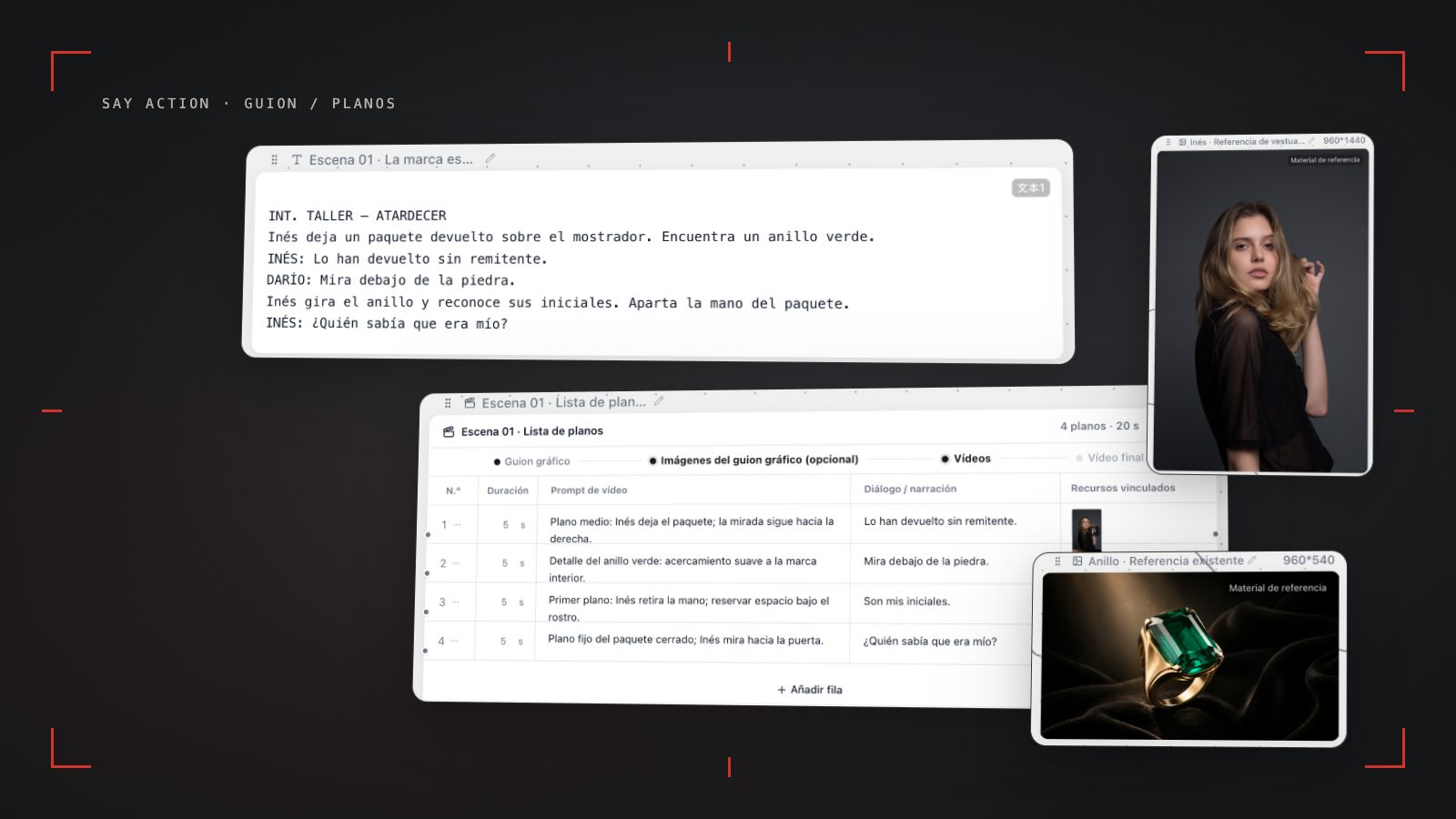
Say Action delivers this cost control by replacing legacy linear black-box interfaces — where fixing a single flawed shot often forces regenerating an entire multi-clip sequence — with an interactive infinite canvas. The script is broken down into an editable storyboard table where every row connects dialogue, camera framing, and motion prompts to isolated image and video nodes. Before launching any rendering job, the canvas displays the exact estimated credit consumption based on target duration and selected model, giving line producers complete financial visibility across every second of footage.
Credit Breakdown: What Every Shot Costs on the Canvas
The foundational rule of production cost optimization is understanding exactly which canvas operations consume credits and which require no credits. Inside Say Action, all narrative pre-production — drafting scripts across dedicated nodes, breaking down scenes, editing storyboard table rows, assigning cast character cards, and writing cinematic camera directions — costs exactly zero credits. A writing and directing team can outline all 50 episodes of a season on the canvas, refine character arcs, and lock dialogue rhythms without spending a single generation credit before rendering begins.
When visual generation commences, expenses split into two distinct tiers with very different budgetary weight: static keyframes versus dynamic video nodes. To enforce visual continuity, professional teams first generate anchor keyframes using image models such as Nano Banana or GPT Image. These still frames consume a modest number of credits and let directors confirm wardrobe, lighting, staging, and facial identity before committing to motion. Once the keyframe is locked, it can route into an image-to-video node using models such as Seedance 2.0/2.5 or MiniMax Hailuo (while Kling v3 and Kling v3 Turbo on Say Action are dedicated to text-to-video generation, alongside models like Wan 3.0), where credit deductions scale according to duration in seconds, chosen resolution, and the routed model engine.
To check generation parameters applicable to any task, always consult verified product rules: See available models, resolutions, and estimated credits on the creation page. The final credit charge is shown before you submit. Furthermore, Credits are estimated from channel pricing; final deduction follows the price tiers configured in the admin backend. Per-second video billing is pre-authorized by requested seconds; if upstream output exceeds the request, a small concession difference may occur. Rather than inventing fixed dollar figures per shot, commercial directors calculate budgets by multiplying shot counts by the target model's rate plus a controlled contingency buffer for creative adjustments.
| Production Phase | Canvas Action | Budget ControlCredit Consumption | Cost-Saving Recommendation |
|---|---|---|---|
| Development & Script | Script node writing, storyboard table breakdown, and character assignment | 0 credits (Free) | Lock dramatic intent and dialogue pacing before initiating any generation |
| Keyframe Visual Anchoring | Initial frame generation via Nano Banana or GPT Image | Modest consumption per still image | Inspect wardrobe, eyelines, and lighting before launching video motion |
| Pacing Preview Draft | 768P draft test clip (4–5 s) to validate blocking and cut transitions | Moderate credit consumption | Spot physical deformities and check editorial rhythm in the rough cut |
| Master 2K Rendering | Final 2K render via Seedance, MiniMax Hailuo, Kling v3, or Wan 3.0 | Scaled by resolution and routed engine | Apply exclusively to approved shots locked in the draft timeline |
| Surgical Shot Retries | Motion prompt revision and re-render on an isolated node | Deduction applied only to modified node | Adjust camera vectors rather than regenerating entire sequences |
Structure verified in Say Action product code as of October 11, 2026. Exact costs are previewed before every submission.
The Previsualization Strategy: 768P Drafts and 2K Master Rendering
The single most frequent cause of depleted production budgets is attempting to render every shot directly in 2K resolution from the first pass. In vertical short drama storytelling (9:16 mobile aspect ratio), an editor's first priority is verifying narrative momentum: checking whether the cut between an over-the-shoulder shot and an extreme close-up feels natural, whether camera movement mirrors emotional tension, and whether eyelines maintain spatial continuity. Running a complete first pass in 768P draft resolution for 4 to 5 seconds per shot allows directors to validate storytelling coherence while consuming substantially fewer credits than high-fidelity renders.
When reviewing this 768P rough cut on the canvas, the directing team can triage shots into three operational categories: takes that work immediately on first render; takes with solid framing that need minor motion prompt adjustments; and conceptually flawed setups requiring complete rethinking. Because Say Action maintains isolated node workflows, creators do not need to restart the scene. You simply open the specific node, refine the prompt (for instance, replacing a wild spin with a disciplined camera push-in), and re-render at 768P until continuity clicks.
Only when the entire sequence is locked in draft does the team proceed to pass two: upgrading approved shots to 2K resolution using high-fidelity engines like Seedance 2.5, MiniMax Hailuo, Kling v3, or Wan 3.0. This two-tier method helps ensure that premium render credits are spent on footage selected for the final cut. Remember that Connect character references to the reference or first/last-frame inputs supported by the selected model, then confirm resolution and duration. Capabilities depend on the model and provider; reference images do not guarantee perfect consistency.
When to Activate BYOK (Bring Your Own Key)
As production volume expands, deciding between purchasing platform credit packages and activating BYOK (Bring Your Own Key) represents a studio's most critical financial pivot. For solo creators, proof-of-concept tests, or pilots spanning 1 to 3 episodes, the Say Action Standard subscription (USD 29.90 per month with 1100 credits included) provides an effortless, turnkey environment, removing the friction of configuring multiple external provider dashboards or managing developer billing thresholds.
However, for a dedicated commercial studio producing 20 or more episodes each month across multi-season slates, the aggregate generation volume makes BYOK significantly more economical. With Say Action's BYOK Studio Pass (USD 29.00 per 6 months of workspace service, with zero bundled model credits), studios can connect their own official API keys from model providers. In BYOK mode, Say Action adds no platform markup and deducts 0 generation credits on model calls, letting teams access direct upstream developer pricing.
Understanding the operational and security boundaries of this model is essential: The service fee covers the workspace, not model usage. Provider API charges are separate. In addition, review provider integration and credential safety rules: BYOK supports a custom API endpoint, model key and headers. For OneAPI, NewAPI or another relay, select the OpenAI, Gemini or Claude protocol that matches its actual API, then check model IDs and image/video endpoint support. Not every relay or private protocol works automatically. BYOK model calls have no platform model markup or platform generation-credit deduction; workspace access and provider usage are still billed separately. Connect only trusted providers and use HTTPS in production. Custom requests are forwarded through the authenticated backend; required prompts, reference assets and credentials take part in the request. Never put API keys, passwords or secret-bearing headers in public canvases, screenshots or support requests.
Failure Protection and Transparent Credit Policies
A vital pillar of budget predictability is institutional protection against upstream generation timeouts and infrastructure disruptions. Inside Say Action, credit handling for technical errors follows a clear rule: When the upstream explicitly reports failure, reserved credits are refunded; tasks with unclear network status stay pending review to avoid double settlement. It is critical to distinguish between objective infrastructure failures (such as server drops or gateway timeouts), where reserved credits are automatically restored, and subjective creative retries (such as wanting a softer smile or warmer rim lighting), which represent standard creative iterations.
To help protect credit balances and improve shot success rates, production teams should execute this 5-point pre-flight checklist before launching any video job: 1) Lock script lines and dialogue in the storyboard table row (free editing); 2) Generate and inspect an initial keyframe using Nano Banana or GPT Image to help verify wardrobe and eye direction; 3) Limit motion prompts to a single dominant cinematic movement (Pan, Dolly, or Tilt), avoiding conflicting directional commands; 4) Pre-select 768P draft resolution and a 4 to 5-second clip duration; 5) Confirm the estimated credit cost on the node button before initiating generation.
Once all shots achieve final approval, delivery leverages Say Action's local-first architecture. Generated video assets can be saved directly to a local hard drive folder via the browser's File System Access API, automatically organized by scene and shot number (e.g., Ep01_Shot04_MiniMax.mp4). With files secured on local storage, editing teams can import them into standard NLEs (such as CapCut or Premiere Pro) to assemble pacing with J- and L-cuts, layer sound design, and superimpose vertical subtitles, completing the season on schedule and strictly within budget.
Connect your own API channels and third-party relays
In model-channel settings, enter the Base URL and API key, then configure the protocol, model IDs and required headers from your provider's documentation. Check the image and video modes you need before generating. Paths, resolutions and first/last-frame inputs depend on the connected channel. An adaptation request for an unsupported channel is not a compatibility guarantee.
BYOK supports a custom API endpoint, model key and headers. For OneAPI, NewAPI or another relay, select the OpenAI, Gemini or Claude protocol that matches its actual API, then check model IDs and image/video endpoint support. Not every relay or private protocol works automatically. BYOK model calls have no platform model markup or platform generation-credit deduction; workspace access and provider usage are still billed separately.
Connect only trusted providers and use HTTPS in production. Custom requests are forwarded through the authenticated backend; required prompts, reference assets and credentials take part in the request. Never put API keys, passwords or secret-bearing headers in public canvases, screenshots or support requests.
Frequently asked questions
Approximately how many credits do I need to produce a 1-minute episode?
A standard 60-second episode typically requires between 10 and 12 narrative shots. By following a two-pass strategy (validating 768P draft motion first and reserving 2K rendering for approved shots), credit usage is calculated cleanly by multiplying shot count by each model's rate. The canvas interface displays exact credit estimates prior to confirming any generation.
Do the script editor and storyboard shot list consume credits in Say Action?
No. All text-based pre-production, including script writing, scene division in the storyboard table, dialogue editing, and cast assignment, requires no credits. Credits are consumed exclusively when requesting image keyframes or video clip generations from underlying AI models.
What is the cost difference between generating in 768P and 2K?
Generating in 768P resolution uses substantially fewer credits per second and renders noticeably faster, making it ideal for verifying visual continuity, camera motion, and edit pacing before committing budget to master 2K renders.
What happens to my credits if a shot fails during generation?
When the upstream explicitly reports failure, reserved credits are refunded; tasks with unclear network status stay pending review to avoid double settlement.
Can I connect OneAPI, NewAPI and custom headers?
BYOK supports a custom API endpoint, model key and headers. For OneAPI, NewAPI or another relay, select the OpenAI, Gemini or Claude protocol that matches its actual API, then check model IDs and image/video endpoint support. Not every relay or private protocol works automatically. BYOK model calls have no platform model markup or platform generation-credit deduction; workspace access and provider usage are still billed separately.