
AI Agents & MCP
Automate Short Drama Storyboards with Claude Code and MCP: From Script to Canvas Shots
Connect Claude Code and Codex via Model Context Protocol (MCP) to the Say Action canvas: turn raw scripts into a 12-shot vertical drama storyboard table, review keyframes, and safeguard credits.
On this page
- Why Claude Code and MCP Transform Short Drama Storyboarding
- Say Action MCP Server Architecture and Permission Boundaries
- Structured Prompts for Claude Code: 12-Shot Short Drama Breakdown
- Human-in-the-Loop Review and Keyframe Visual Preview
- Agent Token Costs and Canvas Credit Safeguards
- Connect your own API channels and third-party relays
Why Claude Code and MCP Transform Short Drama Storyboarding
This article was written by the Say Action team. The recommendations and pipeline guide reflect our production experience connecting scripts, storyboards, MCP tools, and shot-by-shot video generation, not an independent lab benchmark. As vertical short drama production shifts from solo indie experiments to high-output studios delivering dozens of 60-to-90-second episodes weekly, the most grueling operational bottleneck has become script breakdown and storyboard generation. A single 60-second episode typically requires 10 to 14 rapid-fire shots, meaning an entire 50-episode season demands hundreds of tightly sequenced frames. The conventional workflow—manually copying dialogue from a document, pasting snippets into disparate AI video generators, and typing individual camera movement prompts—leads to severe creative fatigue and human error. Frequently, narrative tension fractures, scene numbering slips, and critical visual cues get lost in translation.
To eliminate this repetitive friction, innovative technical directors and AI creators are turning to Anthropic's Claude Code and OpenAI's Codex powered by the Model Context Protocol (MCP). MCP is an open standard that allows large language model (LLM) agents to step outside the isolated conversational bubble and directly operate external tools and studio workspaces. When given a complete screenplay, the agent does not merely produce static text summaries; it actively analyzes pacing, dialogue beats, and visual hooks tailored specifically to mobile vertical drama, translating high-level storytelling into concrete, executable shot records.
By connecting Claude Code directly to Say Action's remote MCP server, creators establish a seamless pipeline where a single terminal instruction creates an infinite canvas project and populates standard storyboard rows. The agent handles mechanical scene decomposition, camera syntax standardization, and shot sequencing, allowing the human director to focus on artistic supervision, visual continuity, and emotional delivery. This fusion drastically shortens pre-production cycles while helping improve the technical consistency of short drama output.
Say Action MCP Server Architecture and Permission Boundaries
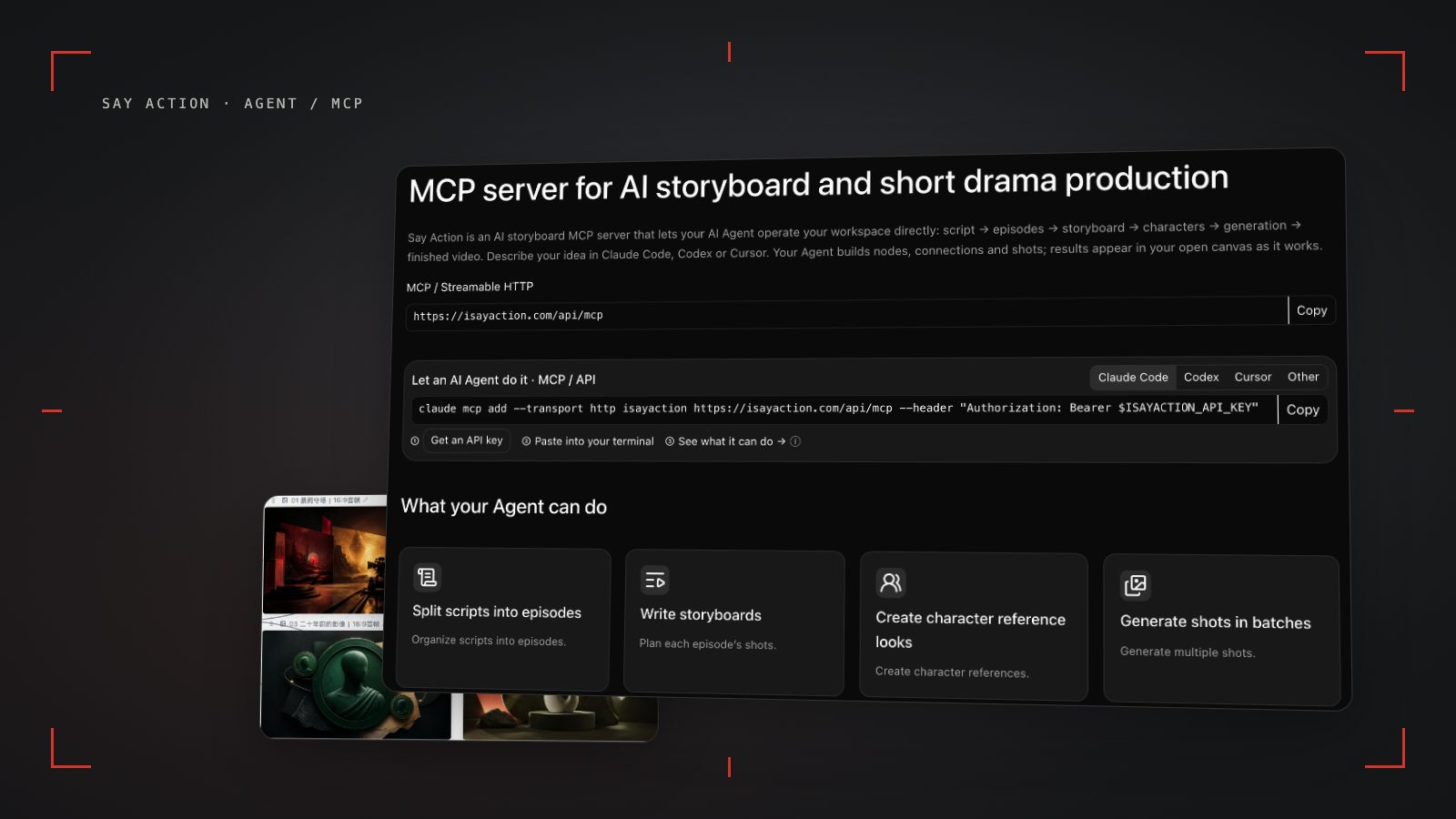
Say Action's MCP infrastructure runs over Streamable HTTP at https://isayaction.com/api/mcp. Instead of browser cookies, it uses scoped personal access keys with Bearer token authentication, enabling reliable automation from local terminal sessions, CI environments, or script runners. After exporting your key in a Unix shell via export ISAYACTION_API_KEY="yc_live_...", running the command claude mcp add --transport http isayaction "https://isayaction.com/api/mcp" --header "Authorization: Bearer $ISAYACTION_API_KEY" immediately registers Say Action's official toolset within Claude Code.
The MCP tools for short drama production follow a structured hierarchy. You begin by calling get_account and list_models to verify your credit balance and available production models, followed by create_project to instantiate a dedicated 9:16 vertical canvas project. Then, calling import_script, batch_add_storyboard_cards, or set_unit_shots automatically injects scene metadata, shot IDs, character assignments, dialogue lines, and optical camera prompts as individual rows within the canvas storyboard table. Reconnecting with the expert profile (?profile=expert) grants access to character reference nodes, allowing the agent to bind pre-existing cast assets directly to shot rows.
The cornerstone of this architecture is an uncompromising safety and permission boundary: video generation is intentionally decoupled from autonomous agent execution. While Claude Code has full authority to parse scripts, structure shot tables, and draft visual prompts, it cannot trigger high-cost video generation tasks without explicit human confirmation. This structural gate helps prevent automated agent loops or parsing hallucinations from inadvertently firing dozens of billable video tasks. Every generation run requires the human director to review the storyboard rows on the interactive canvas before initiating compute.
Structured Prompts for Claude Code: 12-Shot Short Drama Breakdown
To coax production-ready storyboards from Claude Code, prompts must reflect the rigorous pacing requirements of mobile vertical dramas rather than conventional cinema rules. Because mobile viewers often decide whether to keep watching in the opening moments, shots 1 and 2 work best with an immediate visual hook—typically an intense close-up or abrupt crisis point. Shots 3 through 7 establish rapid dialogue exchanges using alternating over-the-shoulder (OTS) reverse angles to build dramatic tension. Shots 8 through 10 showcase the climactic confrontation or revelation, while shots 11 and 12 end on a high-stakes facial cliffhanger designed to encourage the next episode click.
A production-grade prompt template executed inside Claude Code CLI looks like this: "Using Say Action tools, decompose the Episode 1 script for 'Heir's Revenge' into exactly 12 vertical (9:16) storyboard shots. Shot 1 must be an extreme close-up hook under 2 seconds. Shots 2 through 7 should alternate rapid dialogue between Min-jun and the secretary. Shots 8 through 10 must capture the confrontation climax, and shots 11 and 12 must frame a chilling cliffhanger smirk. Assign unique idempotencyKey values to each shot creation, preserve dialogue faithfully, and decouple camera movements from character physical actions. Populate the canvas storyboard table without calling video generation."
A vital prompting principle is explicitly decoupling camera movement syntax from subject physical action. If a prompt conflates camera motion with actor movement, underlying diffusion and transformer video models frequently produce severe motion blur or body warping. Instruct Claude Code to format prompts with distinct structural tokens, such as "Dolly In 45mm Lens / Subject Min-jun turns his head sharply." Separating optical kinematics (Dolly, Pan, Tilt, Roll, Tracking) from character actions helps downstream video models compute motion vectors cleanly and maintain facial consistency.
Upon receiving the command, Claude Code executes batch calls to Say Action's batch_add_storyboard_cards tool, constructing a sequential lineup from Shot_01 through Shot_12. Each row captures the shot number, target duration (e.g., 2.5s, 4s), spoken dialogue, assigned cast tags, and descriptive visual prompts. The terminal logs each operation and returns an authenticated canvas URL, allowing the director to open the workspace in a browser and visually inspect the full episode layout instantly.
Human-in-the-Loop Review and Keyframe Visual Preview
Even the most advanced LLMs cannot intuitively divine a director's exact aesthetic taste regarding cinematic lighting, subtle eye-lines, or set dressing nuances from text alone. The Human-in-the-Loop stage is therefore an essential checkpoint in short drama production. Say Action's infinite canvas renders every agent-created row as an editable visual entity, enabling directors to adjust framing, modify text, and verify dramatic pacing with standard mouse and keyboard interactions.
Before triggering video renders, creators should follow a disciplined 3-step director checklist. Step 1: Cast and dialogue integrity. Confirm that dialogue lines are fully distributed without omitted sentences and that character tags correctly reference established visual assets. Step 2: Camera movement sanity check. Check that conflicting motion verbs (such as simultaneous dolly-in and lateral panning) are reconciled into a single, deliberate camera vector. Step 3: Still keyframe preview. Instead of rendering expensive videos immediately, run Say Action's cost-efficient Nano Banana or GPT Image nodes to render one master still per shot, visually checking for stylistic consistency across all 12 frames.
Once keyframe stills are approved, directors route each shot to the production video model best equipped for its dramatic demands. On Say Action, creators can allocate distinct models per shot: route dialogue close-ups and nuanced micro-expressions to MiniMax Hailuo; assign dynamic physical action, stunt beats, or fast camera moves to Kling v3 text-to-video or Kling v3 Turbo text-to-video; and direct expansive scenes requiring smooth spatial coherence to Seedance 2.0/2.5 or Wan 3.0 (wan3.0-*). If an individual shot requires revision, the director simply regenerates that single node without disturbing the remaining eleven approved clips.
Agent Token Costs and Canvas Credit Safeguards
When operating an automated MCP workflow, creators must manage a dual-cost architecture: LLM token consumption versus visual generation credits. Analyzing screenplays and organizing storyboard rows consumes external LLM tokens (billed directly by Anthropic or OpenAI for Claude Code), whereas rendering keyframe images and video shots consumes platform credits in Say Action. Because text analysis is exceptionally cost-effective, refining scripts and iterating on 12-shot structures in Claude Code before generating visual media is the single most effective way to protect overall production budgets.
To prevent financial runaway from script bugs or recursive agent loops, Say Action provides cumulative spending limits on the /access-keys page. Directors can configure caps such as 200, 500, or 1,000 credits on an API key; once that ceiling is reached, further billable calls are immediately rejected until adjusted. Furthermore, every MCP tool call requires an 8-to-128-character idempotencyKey. If an unstable network connection forces an automated retry, the server recognizes the identical key and returns the existing result, helping prevent duplicate credit charges or redundant canvas nodes.
All billing tiers, credit estimation formulas, and refund policies follow official product definitions. When a video task fails due to an explicit model provider error, reserved credits are returned to your account. Studios with high volume or existing corporate API keys can also connect external endpoints directly through the BYOK Studio Pass. For complete plan terms and credit rules, refer to official product documentation: Credits are estimated from channel pricing; final deduction follows the price tiers configured in the admin backend. Per-second video billing is pre-authorized by requested seconds; if upstream output exceeds the request, a small concession difference may occur. The service fee covers the workspace, not model usage. Provider API charges are separate. When the upstream explicitly reports failure, reserved credits are refunded; tasks with unclear network status stay pending review to avoid double settlement. BYOK supports a custom API endpoint, model key and headers. For OneAPI, NewAPI or another relay, select the OpenAI, Gemini or Claude protocol that matches its actual API, then check model IDs and image/video endpoint support. Not every relay or private protocol works automatically. BYOK model calls have no platform model markup or platform generation-credit deduction; workspace access and provider usage are still billed separately.
Connect your own API channels and third-party relays
In model-channel settings, enter the Base URL and API key, then configure the protocol, model IDs and required headers from your provider's documentation. Check the image and video modes you need before generating. Paths, resolutions and first/last-frame inputs depend on the connected channel. An adaptation request for an unsupported channel is not a compatibility guarantee.
BYOK supports a custom API endpoint, model key and headers. For OneAPI, NewAPI or another relay, select the OpenAI, Gemini or Claude protocol that matches its actual API, then check model IDs and image/video endpoint support. Not every relay or private protocol works automatically. BYOK model calls have no platform model markup or platform generation-credit deduction; workspace access and provider usage are still billed separately.
Connect only trusted providers and use HTTPS in production. Custom requests are forwarded through the authenticated backend; required prompts, reference assets and credentials take part in the request. Never put API keys, passwords or secret-bearing headers in public canvases, screenshots or support requests.
Frequently asked questions
Can Claude Code automatically trigger video generation on the canvas?
For credit safety, video generation is kept behind an intentional permission boundary. Claude Code analyzes the script and populates storyboard rows with prompts and dialogue, but final video rendering requires the director to review the framing and model settings on the canvas before launching tasks, preventing automated loops from draining credits.
How do I connect the Say Action MCP server to my local development environment?
After creating an API key on the /access-keys page and exporting it as an environment variable (ISAYACTION_API_KEY), run claude mcp add --transport http isayaction "https://isayaction.com/api/mcp" --header "Authorization: Bearer $ISAYACTION_API_KEY" in your terminal to connect immediately and discover available tools.
Are character reference images automatically linked when breaking down scripts into storyboards?
If character reference nodes already exist on the canvas, you can instruct Claude Code with the node IDs or character names in your prompt to bind them directly to the shot rows. If references are not yet set up, you can connect them visually on the web canvas afterward.
Can I manually edit storyboard rows created by the agent in the web UI?
Yes. All storyboard rows, dialogue lines, framing tags, and camera movement descriptions created via MCP can be freely clicked and edited on the web canvas. Modifying text and prompts consumes zero platform credits, allowing full director polish before rendering.
Can I connect OneAPI, NewAPI and custom headers?
BYOK supports a custom API endpoint, model key and headers. For OneAPI, NewAPI or another relay, select the OpenAI, Gemini or Claude protocol that matches its actual API, then check model IDs and image/video endpoint support. Not every relay or private protocol works automatically. BYOK model calls have no platform model markup or platform generation-credit deduction; workspace access and provider usage are still billed separately.