
Vertical drama production
AI for Vertical Mininovelas: From Script to Storyboard for TikTok
Plan an episode hook, turn the script into portrait shots, and review faces and wardrobe before handing clips to an editor.
On this page
- A vertical mininovela and a short dorama are not the same thing
- Build the hook, conflict and episode continuity
- From script to storyboard to shot list
- Review character references, wardrobe and portrait framing together
- Check generation costs and prepare the editing handoff
- Connect your own API channels and third-party relays
A vertical mininovela and a short dorama are not the same thing
In Brazil, a vertical mininovela is a short serialized story designed for phone viewing in a portrait frame. Dorama usually points to Asian drama, especially Korean series, and carries genre and style associations. The terms can overlap: a vertical mininovela may borrow a dorama's emotional pacing, but a short dorama is not automatically a vertical production. Decide whether the project is describing its frame, episode length or aesthetic reference before aligning the script, shots and promotion.
Planning does not have to start with the idea of generating a whole episode. Review is easier when the team defines the episode conflict, the character's objective and the question that carries into the next installment, then breaks scenes into shots that can be checked individually. The script, storyboard, keyframes and clips serve different purposes. Connecting them to their source decisions helps revisions retain the context of dialogue and action.
Build the hook, conflict and episode continuity
A short serial story needs a hook that brings viewers into the situation without relying on a random twist. It could be a message the character should not have received, an unfamiliar object in a familiar room, or a choice that must be made immediately. Write the hook as a visible action, then establish what the character wants, what blocks that goal and how the dramatic question changes at the episode's end.
When writing a scene, separate filmable information from explanatory background. Dialogue records what is said; action and scene description show what is happening. If a line depends on a prop or a reaction in someone's eyeline, keep that detail in the description. At each scene end, note character positions, objects in hand, wardrobe state and emotional change. For returning characters, carry those continuity notes forward instead of introducing the relationship as if it were new.
For an original exercise, imagine a protagonist about to hand over a letter who discovers that the envelope contains someone else's key. Do not expand the premise into a chain of twists before checking whether the action, prop and reaction make the conflict readable. Then decide whether the question belongs at this episode's ending or should be answered in the next one.
From script to storyboard to shot list
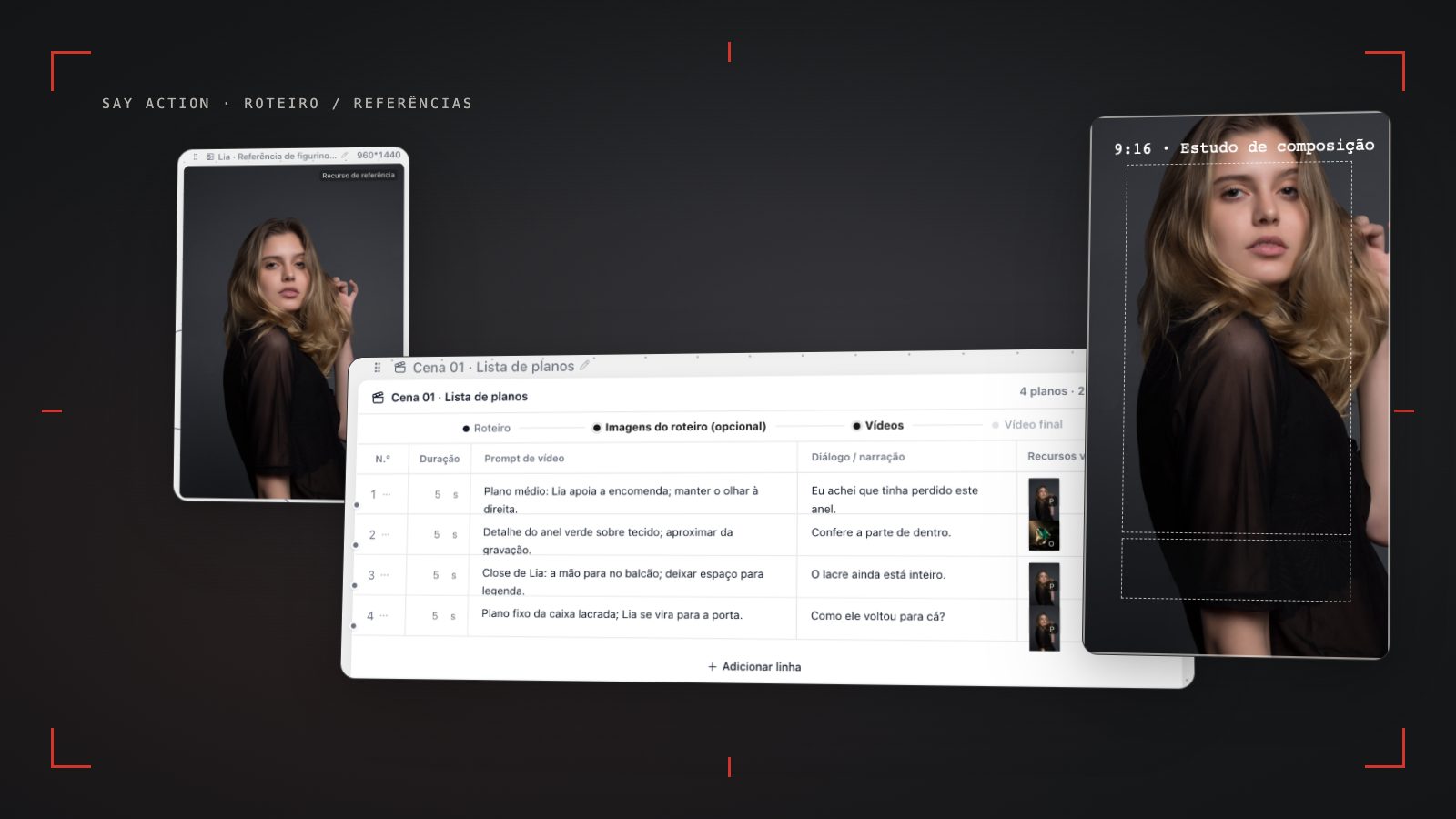
When turning a script into a storyboard, do not make each panel merely repeat a line of dialogue. Break the scene around the information viewers need to see: a shot that establishes the space, a character reaction, a close view of the decisive prop and the follow-up action that shows the result. A shot list can record scene, shot number, scale, visible action, dialogue or sound, character and prop references, aspect ratio and open questions. These fields help the team communicate; they do not require elaborate camera movement in every shot.
Start each shot with one clear action and check that it connects to the next. If a character reaches for a key, the following shot should clarify whether the key is now in hand, whether the character's orientation changed and whether the scene remains in the same space. If one row contains entering, arguing, discovering a secret and leaving, splitting it into shots gives each image a clearer goal and makes it possible to revise only the part that needs work.
A storyboard is a sketch for directors, editors and production teammates to discuss image order; a shot list turns decisions into workable entries. AI can help draft the first pass, but the team still needs to confirm dialogue attribution, cause and effect, pacing and whether each image can be made. Linking a script row to its panel and resulting asset also shows where the image came from and what decisions remain.
Review character references, wardrobe and portrait framing together
Gather useful references for each main character: front and side appearance, hair, wardrobe layers, recurring props and the emotion that should carry through the scene. A reference image helps a model understand the person and visual intent; it does not guarantee an identical face. Reference options vary by model and channel. Check facial features, clothing, prop state and relative positions shot by shot, and note which shots need another pass.
In 9:16, leave room for faces, hand actions and captions. Decide first which expression or prop viewers must read, then arrange background information. In a two-person conversation, depth, eyelines and reaction shots can explain the relationship without putting everyone on one plane. Caption safe areas depend on platform controls, font size and the editing template, so preview the actual frame in its target context before handoff.
If a frame comes from an input flow without portrait output, do not stretch it to fill the screen. Check whether cropping would remove a gesture, prop or eyeline, then choose to recompose, regenerate that shot or keep the frame for a landscape version. Character references, first and last frames, and aspect-ratio options depend on the chosen model. Confirm each shot's current inputs and settings.
Check generation costs and prepare the editing handoff
Cost depends on the selected model, input mode, resolution, clip length and retries. Track keyframes, video generation and provider API usage separately. Before submitting, check the current channel estimate and settings; a generic per-episode figure is not a substitute for a project budget. Say Action subscriptions, credits and service boundaries are described on the pricing page and in the quote shown before generation.
When you connect your own API, workspace service and model-provider charges are separate. Use the current product information for BYOK billing, required connection settings and request routing. Before using a channel, check its model ID, protocol, image or video capabilities and credential handling.
For editing, give clips stable scene and shot identifiers and include the approved script text, references, aspect ratio, dialogue version and adjacent shots that need to connect. Separate discarded drafts from selected assets and flag continuity questions that remain open. Editors can then see which clips are ready for the timeline and which still need a director's review.
When the upstream explicitly reports failure, reserved credits are refunded; tasks with unclear network status stay pending review to avoid double settlement.
Workspace service fee (6 months): USD 29.00 / 6 months. The service fee covers the workspace, not model usage. Provider API charges are separate.
BYOK supports a custom API endpoint, model key and headers. For OneAPI, NewAPI or another relay, select the OpenAI, Gemini or Claude protocol that matches its actual API, then check model IDs and image/video endpoint support. Not every relay or private protocol works automatically. BYOK model calls have no platform model markup or platform generation-credit deduction; workspace access and provider usage are still billed separately.
Connect your own API channels and third-party relays
In model-channel settings, enter the Base URL and API key, then configure the protocol, model IDs and required headers from your provider's documentation. Check the image and video modes you need before generating. Paths, resolutions and first/last-frame inputs depend on the connected channel. An adaptation request for an unsupported channel is not a compatibility guarantee.
BYOK supports a custom API endpoint, model key and headers. For OneAPI, NewAPI or another relay, select the OpenAI, Gemini or Claude protocol that matches its actual API, then check model IDs and image/video endpoint support. Not every relay or private protocol works automatically. BYOK model calls have no platform model markup or platform generation-credit deduction; workspace access and provider usage are still billed separately.
Connect only trusted providers and use HTTPS in production. Custom requests are forwarded through the authenticated backend; required prompts, reference assets and credentials take part in the request. Never put API keys, passwords or secret-bearing headers in public canvases, screenshots or support requests.
Frequently asked questions
How do I turn a vertical mininovela script into a storyboard?
Break the script down by scene objective and visible action, then record framing, action, dialogue or sound, character and prop references, aspect ratio and open questions for each shot. Check continuity between neighboring shots and link each panel to its script row.
Do short doramas have to be filmed vertically?
No. Dorama points to a genre and style context; vertical describes the frame. Choose portrait or landscape for the story and platform. For a 9:16 destination, check caption space in the actual interface.
How do I check a character's face and wardrobe across shots?
Organize authorized references and review facial features, hair, wardrobe, props and relative positions shot by shot. Reference images and first/last frames depend on the model and channel and do not guarantee a perfect match. Record differences and revise only the shots that need work.
Does using my own API key include model charges?
BYOK supports a custom API endpoint, model key and headers. For OneAPI, NewAPI or another relay, select the OpenAI, Gemini or Claude protocol that matches its actual API, then check model IDs and image/video endpoint support. Not every relay or private protocol works automatically. BYOK model calls have no platform model markup or platform generation-credit deduction; workspace access and provider usage are still billed separately.
Can I connect OneAPI, NewAPI and custom headers?
BYOK supports a custom API endpoint, model key and headers. For OneAPI, NewAPI or another relay, select the OpenAI, Gemini or Claude protocol that matches its actual API, then check model IDs and image/video endpoint support. Not every relay or private protocol works automatically. BYOK model calls have no platform model markup or platform generation-credit deduction; workspace access and provider usage are still billed separately.