
Workflow Comparison
Runway for Storyboards: Story Panels vs Canvas Workflows for Short Drama
Compare Runway Story Panels with Say Action's dedicated storyboard canvas across script breakdown, 9:16 vertical framing, multi-model routing, and NLE handoff.
On this page
- Our Stance: Flagship Video Generator vs Dedicated Storyboard Canvas
- Feature and Pricing Breakdown (Runway vs Say Action, October 2026)
- Runway Story Panels vs The Say Action Storyboard Table
- 9:16 Mobile Framing and External NLE Handoff
- When to Use Runway and When to Build on Say Action
- Connect your own API channels and third-party relays
Our Stance: Flagship Video Generator vs Dedicated Storyboard Canvas
This article was written by the Say Action team. The comparison reflects our workflow recommendations for multi-shot vertical drama production across canvas workspaces and routed models, not an independent lab benchmark.
Creators and commercial directors searching for "Runway for storyboards," "Runway AI storyboard," or exploring the recently introduced "Runway Story Panels" feature are fundamentally trying to answer one question: can an industry-leading video generator serve as the central operating system for serialized short drama production? Runway (with its Gen-3 Alpha and Gen-4 model ecosystem) has earned its position as the premier cinematic video generation platform in AI filmmaking. Its physics simulations, photorealistic human lighting, and sophisticated motion controls represent state-of-the-art text-to-video capabilities. With features like Story Panels and official academy tutorials, Runway demonstrated how solo artists can branch visual concepts from an initial image prompt into consecutive visual frames, making it an extraordinarily popular tool for cinematic moodboards, visual lookbooks, and high-concept teaser development.
However, transitioning from loose creative ideation to commercial serialized short drama production—typically 60 to 90 seconds per episode across 12 to 16 tightly sequenced setups—exposes architectural friction when relying solely on an isolated video generator. Short drama filmmaking for mobile platforms is not simply a sequence of unconnected 5-second cinematic spectacles; it is an industrial continuity pipeline. Directors must parse full episodic scripts into discrete shot rows, synchronize specific dialogue beats with character reactions, enforce multi-angle character appearance across reverse-angle cuts, and maintain strict 9:16 mobile framing safe zones. In a standalone clip generator without an integrated storyboard database, every generation yields an independent video asset with arbitrary system hash labels, requiring showrunners to manually catalogue dozens of unindexed clips and wrestle with continuity drift whenever a single setup needs a retake.
Say Action was designed specifically around this structured episodic workflow. Rather than treating storyboarding as an ancillary presentation layer on top of a single proprietary engine, Say Action integrates a multi-row storyboard table, multi-angle character reference anchoring, and multi-model video routing (including production-verified engines such as Seedance 2.0/2.5, MiniMax Hailuo, Kling v3 text-to-video, and Wan 3.0) directly onto an infinite interactive canvas. In this guide, we evaluate Runway and Say Action across four practical production pillars: structured shot list tables versus exploratory story panels, 9:16 mobile composition rules, external non-linear editor (NLE) handoff pipelines, and transparent credit governance with failed-generation refund boundaries.
Feature and Pricing Breakdown (Runway vs Say Action, October 2026)
To establish an objective, verifiable comparison for production studios and independent filmmakers, we cross-referenced official public product documentation and pricing terms from Runway (runwayml.com and runway.com) and Say Action as of October 11, 2026. Rather than presenting arbitrary benchmark scores or synthetic ratings, episodic directors need transparent facts regarding conditioning modes, project management structures, and credit accounting rules.
Pricing mechanics and credit lifecycle policies represent a critical budgeting factor for short drama showrunners. Runway offers a Free plan with 125 one-time starter credits for initial experimentation, alongside paid recurring subscription tiers including Standard, Pro, and Max, with developer API consumption billed separately. Crucially for monthly budgeting, unused generation credits do not roll over on Runway's Standard and Pro plans; they reset entirely at the conclusion of each monthly billing cycle. Credit rollover is exclusive to the highest-tier Max subscription (capped at a single additional month of carryover). For studios producing episodic series with bursty production schedules across weeks, non-rolling credits require strict generation timelines to prevent unused allowances from expiring. Subscription terms and tier prices are subject to periodic platform updates; consult the official Runway pricing page for current rates.
Say Action structures its pricing to decouple workspace management from generative compute consumption, offering predictable membership tiers alongside dedicated Studio Pass options for teams with custom infrastructure. Connect character references to the reference or first/last-frame inputs supported by the selected model, then confirm resolution and duration. Capabilities depend on the model and provider; reference images do not guarantee perfect consistency. Credits are estimated from channel pricing; final deduction follows the price tiers configured in the admin backend. Per-second video billing is pre-authorized by requested seconds; if upstream output exceeds the request, a small concession difference may occur. (USD 29.00 / 6 months; The service fee covers the workspace, not model usage. Provider API charges are separate.). Furthermore, to protect creator budgets during production retries, When the upstream explicitly reports failure, reserved credits are refunded; tasks with unclear network status stay pending review to avoid double settlement.
| Workflow Dimension | Our editorial recommendationSay Action | Runway |
|---|---|---|
| Core focus and primary use | End-to-end episodic short drama canvas: script breakdown, storyboard table, character reference anchoring, and multi-model video generation | Flagship generative video platform: high-fidelity single-clip generation, motion brush controls, and concept visual exploration |
| Script to storyboard breakdown | Script node parses text into an editable multi-row storyboard table with dialogue, shot sizes, and action prompts | Story Panels app allows branching visual panels from seeds; automated script-to-shot-table breakdown is not a native feature |
| Storyboard table and shot metadata | Structured shot rows with Shot ID, character tags, estimated duration, camera movement, and linked video nodes | Independent clip gallery with project folders; tabular shot list metadata is not natively integrated |
| 9:16 mobile aspect ratio | Native 9:16 vertical canvas orientation with mobile title and caption safe zone visualization | Supports vertical aspect ratios (9:16) during generation and cropping; interface is primarily desktop horizontal canvas |
| Character consistency and references | Multi-angle character reference nodes linked across multiple shot rows to anchor visual identity | Prompt-based character styling and image-to-video references per task; persistent character reference sheet graph is not native |
| Video generation and model selection | Multi-model routing per shot: Seedance 2.0/2.5, MiniMax Hailuo, Kling v3 text-to-video, Wan 3.0, GPT Image, and Nano Banana; BYOK relay support | Proprietary Runway model family (Gen-3 Alpha, Gen-4 series); external model routing is not supported |
| Export and NLE asset handoff | Local-first direct folder authorization with standardized production naming (Scene_Shot_Action.mp4) for CapCut / Premiere | Standard browser downloads of MP4 clips with generated hash IDs; manual renaming required before editing |
| Pricing model and credit rollover | Transparent platform subscription tiers with per-shot credit estimation; optional BYOK pass; failed upstream generations refunded | Free tier with one-time starter credits; paid tiers (Standard, Pro, Max); credit rollover available on Max; see official site for current pricing |
| Official sources and verification date | Say Action product architecture and verified pricing documentation | Runway official pricing page and documentation (runwayml.com / runway.com); verified October 11, 2026 |
Runway facts are based on official documentation at runwayml.com and runway.com, checked October 11, 2026. Tier allowances and subscription terms follow the official site. Say Action specifications follow current application code and published pricing terms. Brand names are referenced solely for editorial comparison; no commercial partnership exists.
Runway Story Panels vs The Say Action Storyboard Table
The primary workflow divergence between the two platforms centers on interaction architecture: horizontal conceptual branching versus vertical tabular shot management. Runway's "Story Panels" app was engineered to facilitate visual ideation. Starting from an initial text prompt or uploaded seed image, artists can branch out sideways into multiple panel variations, exploring alternative camera placements, lighting setups, or chronological story beats. This canvas-like visual playground is exceptional for pitch decks, advertising moodboards, and exploratory concept art, allowing directors to pitch visual atmospheres to clients. However, Story Panels functions primarily as an image gallery and storyboard layout tool; it lacks standard production metadata fields such as dedicated dialogue script lines, shot index numbering, audio cues, and targeted lens millimeter designations.
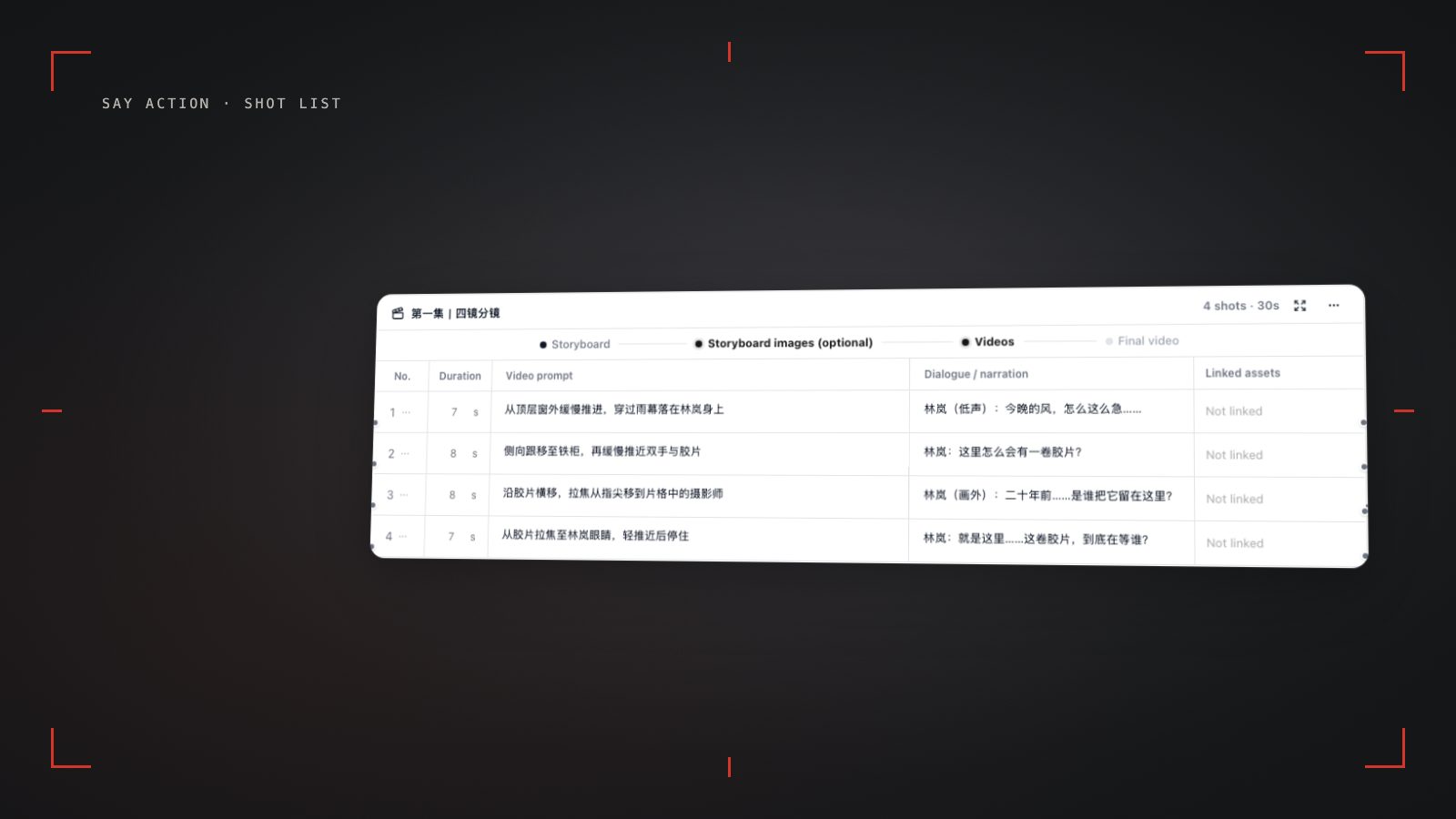
Say Action's Storyboard Table is modeled directly after the professional production binders used by assistant directors (AD) and directors of photography (DP). When a creator pastes an episodic script into the canvas script node, the system parses the narrative into discrete, editable storyboard rows (typically 10 to 14 setups for a 60-second drama). Each row functions as an active production container encapsulating: 1) Shot ID with strict sequential indexing; 2) Cinematic Shot Type and angle (such as Extreme Close-Up, Medium Close-Up, or Over-the-Shoulder); 3) Character attribution tags bound to multi-angle reference nodes; 4) Exact dialogue lines and sound effects notes; and 5) Granular motion and camera directives. By establishing a rigorous tabular structure, directors can audit the pacing, dialogue density, and emotional trajectory of an entire scene before triggering a single video generation credit.
This structural distinction directly impacts cost efficiency through two-phase pre-visualization. In a direct prompt-to-video environment like Runway, testing whether a three-shot dramatic escalation works requires generating full video clips upfront. If the second shot exhibits poor visual pacing or facial distortion, those credits are irrecoverable. On Say Action, directors execute a disciplined two-phase pipeline: first, generating low-cost static keyframes within each storyboard row (using models like Nano Banana or GPT Image) to confirm framing, eye-lines, and set dressing; second, routing only the validated frames to dedicated video generation nodes (such as Seedance 2.5 for continuous dialogue or Kling v3 text-to-video for rapid action). This two-phase discipline prevents costly retries and gives showrunners greater control over their production burn rate.
9:16 Mobile Framing and External NLE Handoff
Short drama content lives almost exclusively within 9:16 mobile viewports across platforms such as ReelShort, TikTok, ShortMax, and YouTube Shorts. Composing for 9:16 vertical cinema requires fundamentally different visual rules than traditional 16:9 widescreen filmmaking. The narrow horizontal field of view means that wide establishing shots quickly lose emotional intimacy, while lateral camera pans cause motion sickness or sling subjects out of frame. Furthermore, mobile user interfaces impose severe safe zone constraints: the top and bottom of the screen are often covered by platform UI; keep faces and key action in the central area, while the right edge is crowded with interactive engagement buttons. While Runway supports selecting a 9:16 aspect ratio during generation, its browser interface remains horizontally oriented. Say Action incorporates native 9:16 vertical framing overlays directly into every canvas node, allowing creators to preview actor headrooms and lower subtitle safe zones before initiating generation.
To achieve cinematic motion in 9:16 without camera jitter or subject deformation, directors rely on vertical camera vectors: subtle axial push-ins (dolly forward), vertical pedestal shifts, and slow tracking. When routing shots in Say Action to production-verified engines (such as Kling v3 text-to-video, Seedance 2.5, or Wan 3.0), prompt syntax must decouple camera trajectory from character kinematics. Here is a production-proven prompt template structure for vertical short drama scenes: 1) Opening Hook Extreme Close-Up: "[9:16 Vertical Framing] Extreme Close-Up (ECU) of female protagonist's face, 28 years old, tear brimmed in left eye with trembling lower eyelid, subtle micro-expression of shock transitioning to suppressed rage | Camera Movement: slow axial push-in (dolly forward), stable tripod center, 50mm portrait lens, shallow depth of field, 24fps | Lighting: sharp 45-degree key light with high-contrast chiaroscuro shadows, locked within the central visual safe zone"; 2) Confrontation Over-the-Shoulder: "[9:16 Vertical Framing] Over-the-shoulder (OTS) medium close-up, camera resting behind male antagonist's dark wool shoulder, framing female protagonist across a mahogany boardroom desk | Female protagonist delivers sharp verbal retort, firm chin, steady breathing | Camera Movement: static locked-off shot, eye-line centered in upper third safe zone, subtle rack focus from antagonist shoulder to lead face | Soft diffuse interior light"; 3) Dynamic Action Low-Angle: "[9:16 Vertical Framing] Low-angle medium shot, camera positioned below waist height looking up as male antagonist slams divorce documents onto glass table | Paper sheets flutter naturally with realistic air physics, clothing creases ripple cleanly | Camera Movement: smooth upward pedestal tilt, rapid forward tracking, cinematic anamorphic lens flare | Cool blue neon rim light contrasting warm tungsten interior".
The final bottleneck in short drama workflows is post-production handoff to non-linear editors (NLEs) such as CapCut, Adobe Premiere Pro, or DaVinci Resolve. When exporting a dozen clips from Runway, media files are downloaded with random system hash strings (for example, "runway_gen3_clip_a9f1b2c4_001.mp4"). An assistant editor must manually open every clip, match it to the script, verify the take number, and rename the asset before cutting. Say Action eliminates this friction through its Local-First asset model: by granting directory permissions via the browser's File System Access API, generated video clips are streamed directly into a designated local project folder, automatically formatted with standardized production nomenclature: "Scene01_Shot01_Hook_ECU.mp4", "Scene01_Shot02_Dialogue_OTS.mp4", and "Scene01_Shot03_Action_LowAngle.mp4", complete with metadata tags for instant timeline assembly.
Before committing assets to the edit suite, production teams on Say Action utilize a mandatory pre-flight checklist: 1) Script-to-Row Audit: Verify that every spoken line, voiceover marker, and sound effect note in the storyboard table matches the approved scratch vocal track; 2) Safe Zone Alignment: Confirm that character eye-lines sit within the central visual area of the 9:16 canvas frame and that lower chin lines leave clearance for bottom mobile captions; 3) Reference Node Validation: Ensure that multi-angle character reference sheets (0-degree frontal, 45-degree three-quarter, and 90-degree profile) are linked to all dialogue rows to preserve facial likeness; 4) Model Assignment Strategy: Route high-momentum action setups to Kling v3 text-to-video, subtle conversational exchanges to Seedance 2.5, and dramatic emotional climaxes to MiniMax Hailuo; 5) Local Sync Verification: Verify that all generated takes have synced to the local project folder with clean Shot ID tags before opening your NLE project file.
When to Use Runway and When to Build on Say Action
Runway represents an extraordinary milestone in artificial intelligence research and generative visual fidelity. If your creative brief requires a standalone high-concept teaser, an experimental cinematic music video, complex 3D camera trajectory paths, or visual effects spectacles demanding the absolute peak of Gen-4 motion dynamics, Runway is an indispensable industry tool. Its creative flexibility empowers artists to explore unconstrained visual frontiers without being boxed into a rigid tabular screenplay format.
Conversely, when your objective is commercial short drama serialization—where an episodic narrative must be broken down into 12 to 16 linked shots, character identities must be maintained across conversational reverse-angles, and assets must be handed off rapidly to mobile video editors—Say Action provides the requisite end-to-end production architecture. By consolidating script decomposition, tabular shot lists, multi-angle reference anchoring, and multi-model video generation (utilizing verified models including Wan 3.0 text-to-video, Kling v3 text-to-video and Turbo, Seedance 2.0/2.5, MiniMax Hailuo, GPT Image, and Nano Banana) onto a single infinite canvas, Say Action transforms unpredictable generative AI into a repeatable studio pipeline.
Production scale ultimately hinges on cost predictability and architectural control. Say Action provides granular per-shot credit previews prior to rendering, and safeguards budgets with transparent refund rules: Credits are estimated from channel pricing; final deduction follows the price tiers configured in the admin backend. Per-second video billing is pre-authorized by requested seconds; if upstream output exceeds the request, a small concession difference may occur. The service fee covers the workspace, not model usage. Provider API charges are separate. Current Studio Pass service fee: USD 29.00 / 6 months. BYOK supports a custom API endpoint, model key and headers. For OneAPI, NewAPI or another relay, select the OpenAI, Gemini or Claude protocol that matches its actual API, then check model IDs and image/video endpoint support. Not every relay or private protocol works automatically. BYOK model calls have no platform model markup or platform generation-credit deduction; workspace access and provider usage are still billed separately. Furthermore, When the upstream explicitly reports failure, reserved credits are refunded; tasks with unclear network status stay pending review to avoid double settlement.
Connect your own API channels and third-party relays
In model-channel settings, enter the Base URL and API key, then configure the protocol, model IDs and required headers from your provider's documentation. Check the image and video modes you need before generating. Paths, resolutions and first/last-frame inputs depend on the connected channel. An adaptation request for an unsupported channel is not a compatibility guarantee.
BYOK supports a custom API endpoint, model key and headers. For OneAPI, NewAPI or another relay, select the OpenAI, Gemini or Claude protocol that matches its actual API, then check model IDs and image/video endpoint support. Not every relay or private protocol works automatically. BYOK model calls have no platform model markup or platform generation-credit deduction; workspace access and provider usage are still billed separately.
Connect only trusted providers and use HTTPS in production. Custom requests are forwarded through the authenticated backend; required prompts, reference assets and credentials take part in the request. Never put API keys, passwords or secret-bearing headers in public canvases, screenshots or support requests.
Frequently asked questions
Can Runway generate a complete short drama from a script in one go?
No. Runway does not offer an automated end-to-end pipeline to convert a multi-page drama script into a full episode of sequential video shots. While you can use its Story Panels feature or individual prompts to generate scenes shot by shot, you must manually organize prompts, manage character appearances across separate generations, and assemble the resulting clips in external editing software. Say Action provides dedicated script nodes that automatically break scripts into structured, editable storyboard tables.
Can I use external model channels or BYOK inside Say Action?
Yes. Say Action supports Bring Your Own Key (BYOK) connectivity, enabling creators and studios to route requests through their own API accounts or compatible third-party gateways. Workspace access is provided via a dedicated Studio Pass, while upstream API consumption is billed directly by your connected provider with zero platform token markups.
Why does Say Action focus on the storyboard table rather than direct text-to-video?
Direct text-to-video generation lacks spatial and continuity constraints, which frequently leads to facial drift, inconsistent lighting, and mismatched wardrobe across consecutive short drama shots. By structuring production into a storyboard table, creators first lock dialogue lines, camera movements, and keyframe images. Testing pacing and character consistency before committing video generation credits drastically reduces discarded renders.
Does Runway's credit system roll over into the next billing month?
According to official terms published on runway.com, unused generation credits do not roll over on Standard and Pro plans; they reset at the end of each billing cycle. Credit rollover is only offered on the top-tier Max plan (capped at one additional month). Creators with variable production schedules should factor these expiration rules into their monthly budget.
Can I connect OneAPI, NewAPI and custom headers?
BYOK supports a custom API endpoint, model key and headers. For OneAPI, NewAPI or another relay, select the OpenAI, Gemini or Claude protocol that matches its actual API, then check model IDs and image/video endpoint support. Not every relay or private protocol works automatically. BYOK model calls have no platform model markup or platform generation-credit deduction; workspace access and provider usage are still billed separately.