
Short Drama Production
How to Create AI Storyboards for Vertical Dramas: From Script to Shot Breakdown
Break dialogue and action into shots, review portrait framing and character references, then prepare a storyboard and footage plan for editing.
On this page
- What the script, shot breakdown and storyboard each do
- Organize dialogue and action into individual shots
- Plan portrait framing and room for subtitles
- Use character references to review continuity across shots
- Confirm generation settings and costs before editorial handoff
- Connect your own API channels and third-party relays
What the script, shot breakdown and storyboard each do
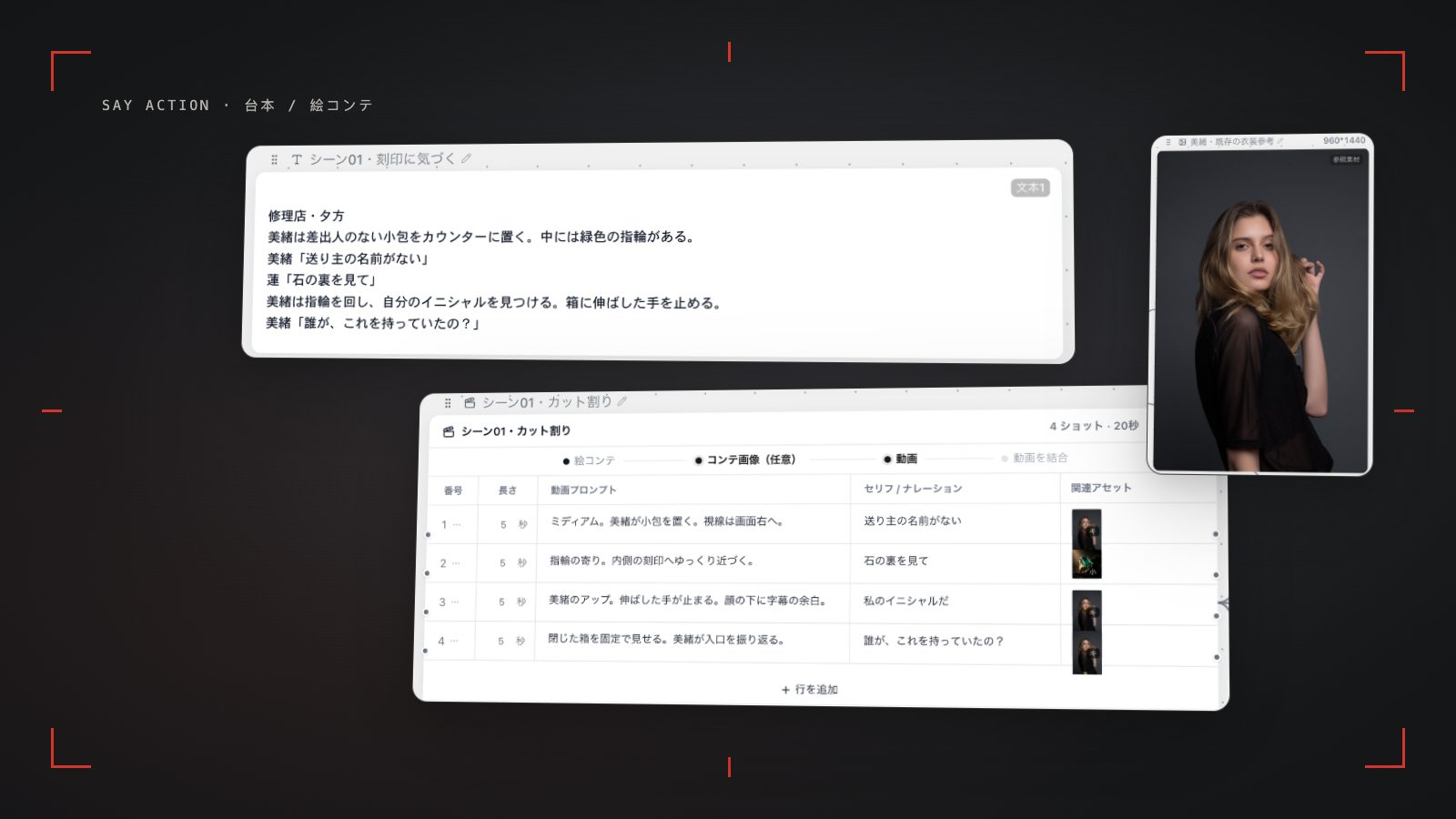
To turn a vertical drama script into a usable production plan, separate three jobs. The script records what characters say and do and how the story changes. The shot breakdown decides what viewers see in each image. The storyboard makes those decisions visible for review. AI can help organize shot ideas and image descriptions, while the creator still decides where the performance matters, whether information reads clearly and how the scene should move.
Start by listing each scene's location, characters, objective and turn, then mark dialogue that must remain intact. Avoid putting every action in an episode into one prompt. Split the material into actions or reactions that can be expressed independently; later you can review, replace or hand off each shot.
Organize dialogue and action into individual shots
Separate dialogue from action directions first. Dialogue is what a character actually says; action directions describe expression, movement, changes in the environment and information the image needs to carry. A conversation might use an establishing view, the speaker, the listener's reaction and a close-up of an important object, but one line of dialogue does not need to equal one shot. Let emotion and cause-and-effect determine the boundaries.
Keep the scene, shot number, shot size, camera position or movement, image content, dialogue, action directions and continuity notes in the storyboard table. If a character notices a letter on a desk, decide when the audience should see it before arranging the character's eyeline and the insert shot. If performance should reveal the information, do not let a prompt give away the turn early. Treat AI shot descriptions as drafts and check positions, prop ownership, eyelines and whether neighboring actions connect.
Plan portrait framing and room for subtitles
Portrait framing changes how you balance people and background information. For a two-person exchange, foreground and background, over-the-shoulder views or separate coverage can show the relationship. When both people share a frame, make sure each remains readable in the narrow composition. Keep a prop, hand movement or expression at the story's visual focus instead of crowding everything into the center just to fill the frame.
Leave space in the composition for subtitles and platform overlays, especially near the bottom and edges. The actual covered area varies by platform, device and publishing interface, so check the target environment before delivery. Aspect-ratio options depend on the model and channel; inspect the current node before generating. Cropping a landscape source into portrait can change the relationship between characters, so decide during storyboarding whether to rebuild the composition or use another shot.
Use character references to review continuity across shots
Prepare reusable appearance notes and authorized reference images for principal characters. Record hairstyle, clothing, accessories, age impression and their state in the scene. Associate references with the shots where the character appears, then review hair, wardrobe, props, light direction and eyeline shot by shot. A reference image provides visual information to a model, but handling differs by model, version and input mode; the result still needs human review.
Continuity review does not mean making every image identical: shot size, expression, lighting and angle naturally change. Check that the character remains recognizable, wardrobe matches story time, props do not change hands without a reason, and action starts and ends coherently. If a model supports first frames, last frames or character references, choose only the inputs that model actually offers. When something looks wrong, identify whether the reference, composition, prompt or edit order is responsible and adjust the relevant shot.
Confirm generation settings and costs before editorial handoff
Before submitting a generation, confirm the model, aspect ratio, duration, resolution and reference inputs for each shot. A storyboard is a production plan, not a promise of finished footage. Dialogue pacing, room tone, subtitles, transitions and final performance rhythm are usually handled in editing software. Available settings and billing depend on the model and channel.
Credits are estimated from channel pricing; final deduction follows the price tiers configured in the admin backend. Per-second video billing is pre-authorized by requested seconds; if upstream output exceeds the request, a small concession difference may occur. When the upstream explicitly reports failure, reserved credits are refunded; tasks with unclear network status stay pending review to avoid double settlement.
For handoff, organize clips, storyboard frames, character references and any needed rights notes by scene and shot number. Use sortable filenames and include aspect ratio, version and open-issue notes. Save the assets where the team expects them, then check shot order, framing, sound and subtitles in the editor. This describes production preparation and handoff; it does not mean automatic publishing to a drama platform.
Connect your own API channels and third-party relays
In model-channel settings, enter the Base URL and API key, then configure the protocol, model IDs and required headers from your provider's documentation. Check the image and video modes you need before generating. Paths, resolutions and first/last-frame inputs depend on the connected channel. An adaptation request for an unsupported channel is not a compatibility guarantee.
BYOK supports a custom API endpoint, model key and headers. For OneAPI, NewAPI or another relay, select the OpenAI, Gemini or Claude protocol that matches its actual API, then check model IDs and image/video endpoint support. Not every relay or private protocol works automatically. BYOK model calls have no platform model markup or platform generation-credit deduction; workspace access and provider usage are still billed separately.
Connect only trusted providers and use HTTPS in production. Custom requests are forwarded through the authenticated backend; required prompts, reference assets and credentials take part in the request. Never put API keys, passwords or secret-bearing headers in public canvases, screenshots or support requests.
Frequently asked questions
Can I create a vertical drama storyboard from a script?
A script can be the starting point for a shot breakdown, and AI can help organize visual suggestions. A creator should then review scenes, dialogue, action, pacing and continuity. A storyboard is a production plan; footage generation and editing still happen in later steps.
Can you guarantee the character's face stays fixed?
No. Reference images and character descriptions can provide visual cues to models that accept them, but results depend on the model, version, prompt and shot conditions. Review identity, wardrobe and action continuity shot by shot and make human corrections where needed.
How should I separate dialogue from action directions?
Put the words a character speaks in dialogue, and use action directions for expression, movement, scene changes and camera instructions. Set shot boundaries around story action and the information viewers need; there is no need to make every line a separate shot.
How do I hand generated shots to an editing program?
Export or save the clips you need by scene and shot number, along with the storyboard, references, aspect ratio and version notes. After importing them into the editor, check order, sound, subtitles and transitions. A production workspace does not replace final editing or publishing.
Can I connect OneAPI, NewAPI and custom headers?
BYOK supports a custom API endpoint, model key and headers. For OneAPI, NewAPI or another relay, select the OpenAI, Gemini or Claude protocol that matches its actual API, then check model IDs and image/video endpoint support. Not every relay or private protocol works automatically. BYOK model calls have no platform model markup or platform generation-credit deduction; workspace access and provider usage are still billed separately.