
Production Workflow
Vertical Short Drama Hook and Pacing: Design High-Retention Beats in AI Storyboards
Master the first-second hook and 60-second, 10-shot pacing structure for mobile vertical dramas. Use Say Action storyboards to lock shot durations, Z-axis staging, and smooth NLE handoffs.
On this page
- Why the First Second Decides the Fate of Vertical Short Drama
- Pacing Architecture: Allocating 60 Seconds Across 10 Shots
- Z-Axis Depth and Close-Up Staging in 9:16 Framing
- Locking Shot Durations and Camera Moves in the Say Action Storyboard
- Exporting Clips and Passing Assets to External NLEs
- Connect your own API channels and third-party relays
Why the First Second Decides the Fate of Vertical Short Drama
This guide was written by the Say Action team. Drawing from our production workflows for vertical mobile drama, it explains how to design retention-focused shot breakdowns and manage AI video pacing. On a smartphone screen where viewers swipe with a thumb, whether an audience watches an episode or scrolls past is decided in the opening second. Traditional three-act cinematic grammar—relying on slow landscape establishing shots and casual character introductions—causes catastrophic immediate drop-off in short drama feeds.
The iron rule of vertical short drama is positioning the dramatic turning point right at second zero. The episode should open in media res: an explosive confrontation, divorce papers slapped onto a desk, an unforgivable betrayal voiced aloud, or an intense close-up of a shattered reaction. Background exposition must wait. The priority is embedding an urgent question in the viewer's mind within one second—demanding to know what just occurred and what will happen next.
In AI-assisted short drama pipelines, this hook determines whether downstream production succeeds. No matter how photorealistic your video model is, if Shot 1 presents a lifeless subject idling in a wide frame, viewer retention collapses instantly. Inside the Say Action shot table, designating Shot 1 as a dedicated hook lets you optimize focal length, dialogue, and forward camera dolly specifically to arrest the thumb and retain the audience.
Pacing Architecture: Allocating 60 Seconds Across 10 Shots
For a 60-to-90-second vertical episode, total shot count should generally be budgeted between 10 and 14 cuts, with tight control over per-shot runtimes. The baseline benchmark is 2 to 4 seconds per cut. Any shot lingering past 5 seconds risks viewer boredom, while erratic sub-second cuts shatter emotional dialogue delivery and undermine visual continuity between AI clips.
A standard 60-second episode divides into five emotional waveform blocks: the 0–3s explosive hook, the 4–15s conflict setup, the 16–45s midpoint escalation, the 46–53s first dramatic reversal, and the 54–60s cliffhanger. Preventing narrative drag across the midsection and introducing a sharp twist near the 45-second mark maintains engagement until the final frame.
The table below outlines a standard 10-shot allocation model ready for immediate implementation in Say Action storyboards. It pairs recommended durations and shot sizes with precise dramatic functions designed to maximize viewer retention. Locking down this timeline structure before firing generation jobs prevents wasted credits and guarantees a tight edit.
| Shot Group | Target Duration | Framing & Angle | Dramatic Function & Retention Goal |
|---|---|---|---|
| Shots 1–2 | 0–3s | Extreme Close-Up (Face or Critical Prop) | First-Second Hook: Immediate confrontation or critical prop reveal; halts the swipe |
| Shots 3–5 | 4–15s | Medium Shot to Over-the-Shoulder (OTS) | Conflict Staging: Establish power asymmetry and opposing motives across snappy lines |
| Shots 6–8 | 16–45s | Tight Close-Up & Waist Shot (Z-Axis Push) | Midpoint Escalation: New evidence or physical advance accelerates narrative momentum |
| Shot 9 | 46–53s | Reaction Close-Up (Shock, Speechless Stare) | Emotional Reversal: Dominance shifts; the aggressor freezes in disbelief |
| Shot 10 | 54–60s | Unfinished Action Close-Up (Mid-Motion Freeze) | Ultimate Cliffhanger: Cut immediately before the punchline or impact to force next-episode playback |
Standard pacing framework adapted for Say Action storyboard workflows. Adjust shot counts and seconds to match specific script dialogue.
Z-Axis Depth and Close-Up Staging in 9:16 Framing
The fundamental visual distinction between vertical drama and widescreen cinema is not merely a trimmed field of view, but a pivot toward vertical height and Z-axis depth. In a 9:16 frame, placing two actors side by side in a wide two-shot produces an uncomfortably cramped, low-detail image. Directors stage along the Z-axis instead: a blurred shoulder or key prop in the immediate foreground, with sharp focal focus locked on the speaking actor in the background, carving out three-dimensional depth on a flat phone screen.
Capturing nuanced dramatic performance requires aggressive reliance on close-ups and extreme close-ups. Micro-expressions, trembling lips, and clenching fists convey high-density emotional information on pocket displays. When prompting AI image and video models, prioritizing tight framing over wide establishing shots reduces facial distortion artifacts and pulls the viewer directly into the character's interior state.
Framing must also respect mobile interface overlays and subtitle safe zones. The top margin of a phone is crowded with account details and search bars; the right edge holds like, comment, and share icons; the bottom contains descriptions and scrub bars. Keeping crucial facial expressions, eye contact, and key props centered in the active safe zone leaves clean lower-third headroom for bold two-line captions.
Locking Shot Durations and Camera Moves in the Say Action Storyboard
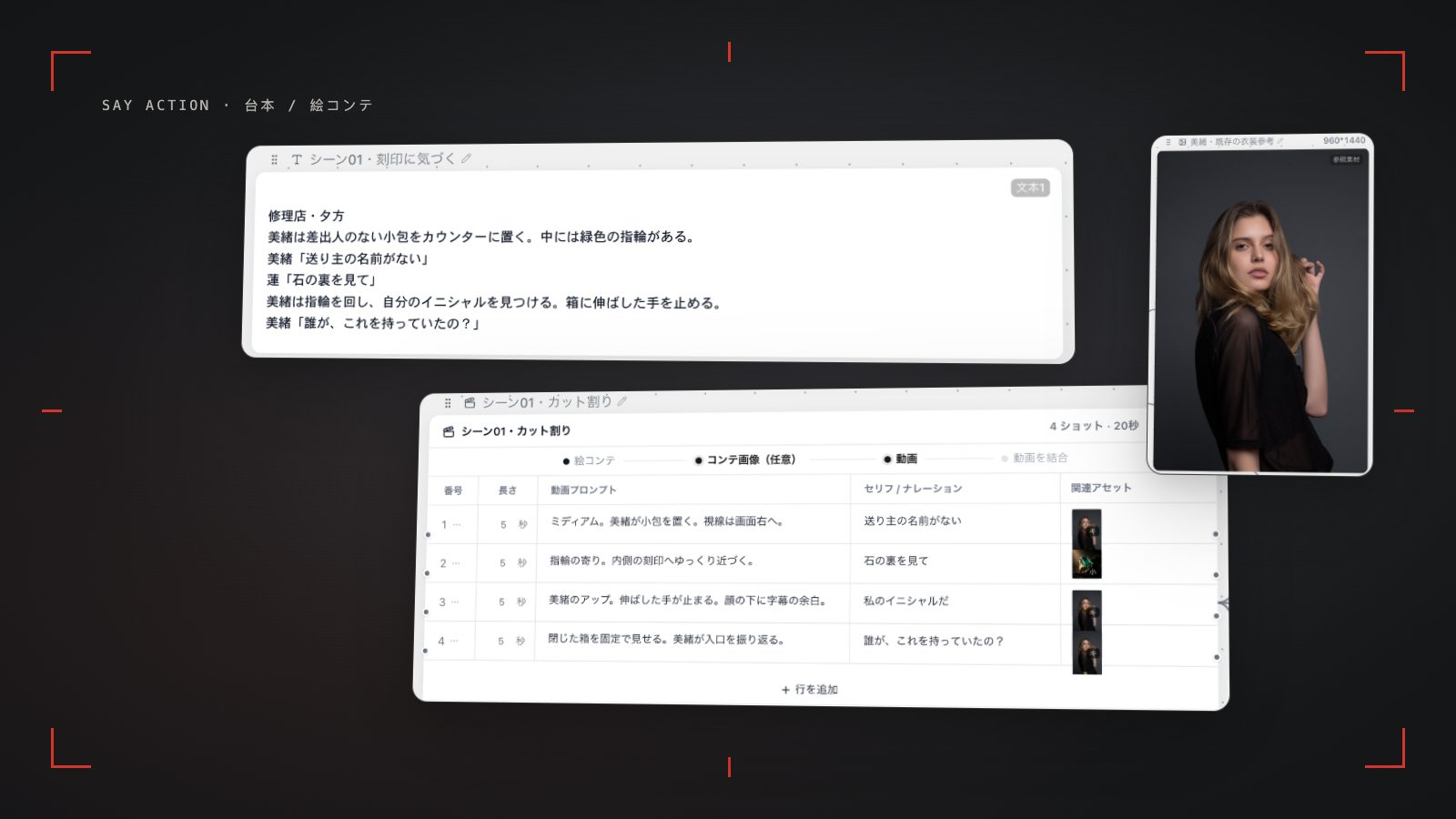
Translating tight pacing into finished video begins by structuring an editable shot table on the Say Action canvas. Each row generated from your script node receives assigned durations, shot sizes, dialogue lines, and motion prompts. Eliminating flabby runtimes early and committing to focused 2-to-3-second cuts with purposeful camera trajectories (such as slow dollies or tracking moves) stops the AI model from introducing wandering, unmotivated drift.
Editing table text, tweaking shot durations, and rewriting camera instructions carry zero cost. Only when you trigger keyframe generation or video nodes does the system display the estimated credit cost based on your chosen model and resolution. Credits are estimated from channel pricing; final deduction follows the price tiers configured in the admin backend. Per-second video billing is pre-authorized by requested seconds; if upstream output exceeds the request, a small concession difference may occur.. When the upstream explicitly reports failure, reserved credits are refunded; tasks with unclear network status stay pending review to avoid double settlement.
Professional workflows avoid blind batch generation across an entire script. Instead, generate static keyframe nodes for the critical opening hook (Shot 1) and core dramatic peaks first to lock art style and character fidelity. Once verified, connect those frames to video generation nodes; if a specific shot exhibits flawed motion, adjust the motion prompt and re-run that single node without discarding the rest of your sequence.
Exporting Clips and Passing Assets to External NLEs
Once video generation finishes across all storyboard rows, the next phase is handing assets over to an external non-linear editor such as CapCut, Premiere Pro, or DaVinci Resolve. From video nodes on the canvas, export generated clips organized by sequential shot numbers (Shot01, Shot02...). Using native browser file system access, high-resolution clips save directly into your designated local project folder with verified download receipts.
On the NLE timeline, arrange clips according to your storyboard's pre-timed beats. Rather than playing raw AI clips end-to-end, trim the initial half-second where models often ramp up motion, as well as lingering tails. Applying J-cuts and L-cuts—letting dialogue spill across cuts into reaction shots—creates an energetic, overlapping cadence that mirrors real human conversation.
The finishing pass layers driving background music, sharp impact sound effects, and bold dynamic subtitles. Shot 1 demands an immediate acoustic punch alongside striking title cards, while Shot 10 should abruptly drop music into sudden silence right as the cliffhanger strikes. This audiovisual contrast leaves the audience breathless and compels an immediate click to the next episode.
Connect your own API channels and third-party relays
In model-channel settings, enter the Base URL and API key, then configure the protocol, model IDs and required headers from your provider's documentation. Check the image and video modes you need before generating. Paths, resolutions and first/last-frame inputs depend on the connected channel. An adaptation request for an unsupported channel is not a compatibility guarantee.
BYOK supports a custom API endpoint, model key and headers. For OneAPI, NewAPI or another relay, select the OpenAI, Gemini or Claude protocol that matches its actual API, then check model IDs and image/video endpoint support. Not every relay or private protocol works automatically. BYOK model calls have no platform model markup or platform generation-credit deduction; workspace access and provider usage are still billed separately.
Connect only trusted providers and use HTTPS in production. Custom requests are forwarded through the authenticated backend; required prompts, reference assets and credentials take part in the request. Never put API keys, passwords or secret-bearing headers in public canvases, screenshots or support requests.
Frequently asked questions
What type of shot works best as the opening hook?
An intense emotional close-up (such as a furious accusation or suppressed tears) paired with a high-stakes dialogue line provides the strongest retention. Avoid slow establishing wides; stepping directly into the center of the conflict is essential for vertical drama.
What is the optimal duration per shot for AI vertical drama?
Between 2 and 4 seconds is ideal for mobile short dramas. Overly long shots drag the pace and increase the likelihood of AI face distortion; fast action or reaction cuts can run roughly 2 seconds, while critical lines should stay under 4 seconds.
Does modifying shot duration or text in the storyboard cost credits?
Editing text, shot framing, and second counts within the storyboard table is completely free. Platform credits are only deducted when generating images or video nodes, with estimated costs displayed prior to launch. When the upstream explicitly reports failure, reserved credits are refunded; tasks with unclear network status stay pending review to avoid double settlement.
Can the AI assistant automatically break down a script into this pacing structure?
Yes. In Say Action, paste your script into a script node and instruct the assistant to 'break this into a 10-shot vertical drama storyboard with a 1-second hook and final cliffhanger.' The assistant generates a structured table that you can review and write to the canvas with one click.
Can I connect OneAPI, NewAPI and custom headers?
BYOK supports a custom API endpoint, model key and headers. For OneAPI, NewAPI or another relay, select the OpenAI, Gemini or Claude protocol that matches its actual API, then check model IDs and image/video endpoint support. Not every relay or private protocol works automatically. BYOK model calls have no platform model markup or platform generation-credit deduction; workspace access and provider usage are still billed separately.