
Script Breakdown
Short Drama Script Breakdown Rules: The 3-Second Hook, Cliffhangers, and a 12-Shot Table
From a 300-word episode script to an actionable 12-shot storyboard: dissect the 3-second hook, mid-point reversals, and cliffhangers on the Say Action canvas with DP-level framing and pacing.
On this page
- The Industrial Rhythm of Short Drama: Second-by-Second Emotional Waveforms
- The Standard 12-Shot Structure for Micro-Drama Episodes
- Translating Literary Prose into Structured Shot Table Columns
- Accelerating Initial Breakdowns with the Say Action Assistant
- Shot Durations, Credit Estimates, and Keyframe Pre-Production
- Batch Generation Queueing and Surgical Shot Refinement
- Connect your own API channels and third-party relays
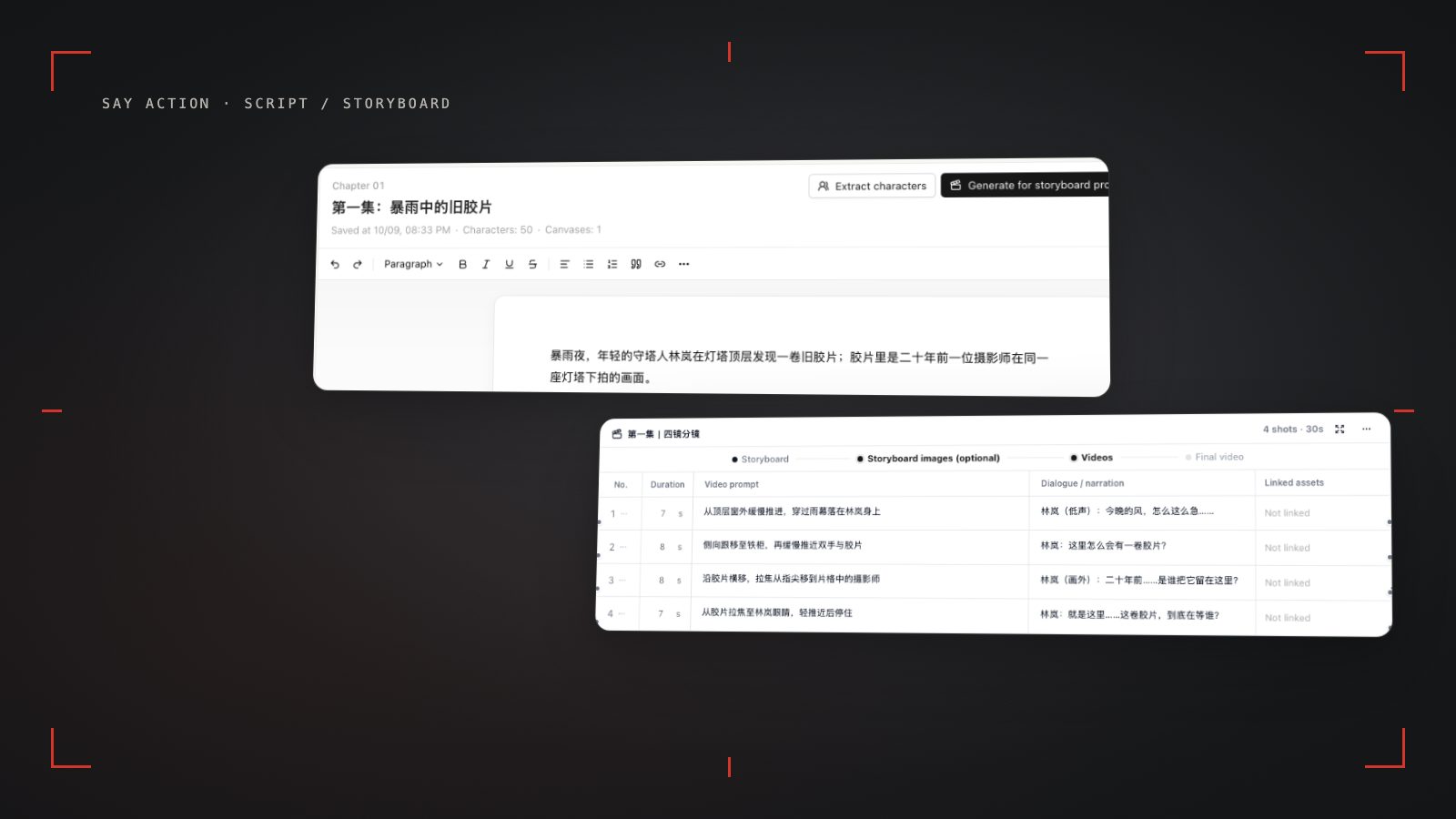
The Industrial Rhythm of Short Drama: Second-by-Second Emotional Waveforms
Traditional feature films and television series rely on the classical three-act structure, using the first several minutes to establish world-building, introduce character backgrounds, and depict ordinary life; however, in the fast-paced vertical micro-drama production pipeline, this leisurely breakdown logic triggers catastrophic audience drop-off. Vertical micro-dramas rely on algorithmic feed distribution or pay-per-episode monetization, where mobile viewers make swipe-away decisions within two to three seconds. If a 60- to 90-second episode opens with empty architectural establishing pans or ambient dead air, completion rates crater instantly. Consequently, breaking down a short drama script requires shifting from traditional scene exposition to a second-by-second emotional waveform, dividing the short episode into five continuous beats: hook, pressure, escalation, reversal, and cliffhanger.
A proven micro-drama emotional waveform must complete a full cycle of tension buildup and catharsis within a 60- to 90-second window. Seconds 0 to 3 form the make-or-break "golden hook," plunging viewers immediately into extreme conflict or high-stakes intrigue. Seconds 4 to 20 establish oppressive antagonist pressure and suppressed protagonist vulnerability, clarifying their opposition. Seconds 21 to 45 escalate tension through critical props, third-party interventions, or physical clashes. Seconds 46 to 70 deliver the episode's primary reversal, where the protagonist's identity or unexpected countermeasure peaks emotional intensity. Finally, seconds 71 to 85 must never resolve smoothly into comfort; the crisis must be suspended mid-motion, engineering an irresistible cliffhanger that compels the viewer to unlock the next episode.
This highly industrialized rhythm requires screenwriters and directors to strip away literary fluff before storyboarding begins. A line of script text is no longer decorative prose; it must translate directly into a sensory audiovisual trigger on a 9:16 mobile display. On the Say Action canvas, scripts enter as foundational upstream nodes. Creators can inspect episode word counts and narrative beats visually, then convert structured scenes into an actionable shot stream through node connections, setting definitive time benchmarks and composition boundaries for keyframe generation and downstream video models.
The Standard 12-Shot Structure for Micro-Drama Episodes
Within a 60- to 90-second episode format, breaking the narrative into 10 to 14 shots—specifically the battle-tested 12-shot template—represents the most reliable and cost-effective standard in modern short drama production. If an episode contains fewer than 8 shots, average shot durations exceed 8 seconds; this low visual density bores mobile viewers, and AI video diffusion models tend to accumulate facial distortion and limb warping over extended temporal windows. Conversely, exceeding 16 shots fragments the visual rhythm, multiplies prompt engineering and generation queues, and creates immense friction during external NLE cutting and dialogue synchronization. A standardized 12-shot structure locks average shot lengths between 2.5 and 3.5 seconds, maximizing pacing while operating comfortably within AI video models' optimal physical motion sweet spot.
In this 12-shot blueprint, shots 1 and 2 must anchor strictly in media res. Do not open with characters waking up, brewing coffee, or walking through doorways; launch directly into a hand slapping across a cheek, a divorce contract tearing in half, or an icy confrontation at gunpoint. Visual and auditory density across the first 3 seconds decides viewer retention. Shots 3 through 5 establish spatial relationships and dialogue continuity using clean shot-reverse-shot over-the-shoulder framing, shots 6 through 8 inject dynamic camera tracking to escalate physical momentum, and shots 9 through 10 reward the audience with tight close-ups capturing the protagonist's emotional eruption.
The defining climax of the episode hinges on shots 11 and 12: the ultimate cliffhanger. A vertical drama episode must never fade to black upon peaceful resolution. The golden rule of cliffhangers is "cut on the peak action, suspend the unresolved consequence": an antagonist pulling a trigger right before the discharge, an executive opening a DNA envelope just as the name is revealed, or an elevator door sliding open on a mysterious figure. Freezing the narrative at maximum suspense around second 80 converts immediate curiosity into algorithmic retention and next-episode revenue.
| Shot Range | Dramatic Beat | Recommended Duration | Framing & Camera | Core Objective & Hook Mechanics |
|---|---|---|---|---|
| Shots 1–2 | Golden Hook | 0–3s | Close-up / Extreme Close-up | Throw the viewer into immediate conflict, physical action, or critical props; zero empty establishing shots. |
| Shots 3–5 | Tension Setup | 4–20s | Medium Shot / Over-the-Shoulder | Antagonist presses down while protagonist suppresses reaction; establish eyelines and conflict stakes. |
| Shots 6–8 | Conflict Escalation | 21–45s | Close-up / Dynamic Tracking | Introduce new evidence, third-party disruption, or physical confrontation; accelerate visual momentum. |
| Shots 9–10 | Major Reversal | 46–70s | Tight Close-up / Eyeline Match | Shocking counter-strike, identity revelation, or emotional climax; deliver the peak payoff of the episode. |
| Shots 11–12 | Ultimate Cliffhanger | 71–85s | Extreme Close-up / Motion Freeze | Cut abruptly one second before the decisive outcome; suspend the crisis to trigger the next episode. |
Synthesized from 60–90 second vertical short drama production practices; actual shot counts can be adjusted between 10 and 14 shots based on dramatic density.
Translating Literary Prose into Structured Shot Table Columns
Converting a narrative script into a machine-executable AI storyboard requires decoupling prose descriptions, emotional atmosphere, and spoken dialogue into discrete, standardized data fields. Many creators paste literary paragraphs straight into video prompt boxes, confusing diffusion attention spaces with mixed subjects, scenery, and actions. In the Say Action shot table, every shot row isolates distinct dimensions: Shot Number, Scene & Dialogue, Visual Prompt, Motion Prompt, and Estimated Duration. This tabular separation translates dramatic intent into precise computer vision parameters.
When populating these columns, the Visual Prompt defines static composition, character anatomy, wardrobe texture, lighting ambiance, and spatial depth, establishing a robust anchor for the starting keyframe. The Motion Prompt enforces the "one movement per shot" rule, focusing strictly on camera trajectory and character micro-actions (e.g., "camera slowly dollies in on protagonist's face as eyes widen in shock"), excluding unrelated background descriptions. Framing choices must respect the 9:16 vertical "close-up priority": on mobile screens, medium close-ups (MCU), close-ups (CU), and extreme close-ups (ECU) should make up the majority of shots. Wide shots (WS) should flash for only 1 to 2 seconds to ground spatial geography, avoiding miniature subjects lost on phone screens.
Furthermore, spoken lines must be decoupled visually from complex character blocking. In conventional filmmaking, actors deliver lines while traversing large spaces; in AI video synthesis, simultaneous whole-body movement and lip articulation cause severe geometric warping. In the shot table, divide extended dialogue into dedicated speaking close-ups and reaction shots, advancing the rhythm through alternating rows. On the Say Action canvas, the shot table allows creators to toggle columns, tag character references to specific rows, and bind prompt templates reliably across scenes.
Accelerating Initial Breakdowns with the Say Action Assistant
When handling multi-episode scripts containing thousands of words, manual line-by-line decomposition is mentally exhausting and frequently dulls a creator's sensitivity to dramatic hooks late at night. The Say Action canvas integrates specialized AI assistant capabilities. By feeding a 300- to 500-word episode draft into a script node, creators can prompt the assistant with structured instructions. The assistant follows micro-drama conventions automatically, transforming unstructured prose into an initial 12-shot storyboard draft and drastically slashing pre-production formatting overhead.
To ensure the AI assistant generates shot rows aligned with short drama standards, supply a structured directive with strict constraints: "Break down the provided episode script into a standard 12-row vertical storyboard table. Requirements: 1. Shots 1–2 must establish an intense close-up conflict hook within seconds 0–3, with zero empty scenery; 2. Strictly label eyeline vectors for shot-reverse-shot coverage (Character A facing screen-right, Character B facing screen-left); 3. Prioritize close-ups (CU) and medium close-ups (MCU), reserving wide shots solely for brief spatial context; 4. Motion prompts must restrict to a single camera movement (dolly, pan, or static lock); 5. Shots 11–12 must cut abruptly at the peak dramatic crisis to form a cliffhanger."
Once the assistant generates the draft, directors and producers must perform rigorous human quality control (QC). While AI excels at structuring text and isolating actions, human oversight remains indispensable for nuanced subtext, eyeline continuity across cuts (the 180-degree rule), and emotional calibration. In the Say Action canvas, creators can click any cell to edit dialogue inline, adjust shot durations, delete extraneous movements, or reorder shot rows. Once approved, the shot table becomes the operational hub, driving downstream image and video nodes with confidence.
Shot Durations, Credit Estimates, and Keyframe Pre-Production
With the shot table locked, production shifts into visual pre-production and asset anchoring. In each Say Action shot row, creators specify exact shot durations. Because short dramas demand brisk pacing, dialogue exchanges typically run 2 to 3 seconds, intense physical stunts run under 2 seconds, and dramatic emotional revelations or reaction pauses extend to 4 or 5 seconds. Total episode duration stays tightly controlled within the 75- to 85-second bracket, reserving a brief buffer for title cards and final cliffhanger blackouts.
Before triggering video generation, an expert workflow always executes keyframe generation first. Relying purely on text prompts inside video nodes is the primary driver of wasted generation attempts in AI drama pipelines. Experienced teams generate or import high-resolution initial still frames (using Nano Banana or FLUX image nodes) directly in the canvas shot table, locking facial features, wardrobe textiles, hairstyle, and lighting schemes. Once approved by the director, these keyframe nodes are connected into video nodes' First Frame slots, acting as reliable visual anchors that stabilize the video diffusion trajectory.
For cost and compute management, the Say Action canvas calculates and displays estimated credit consumption for the entire table or individual shots before task execution. Creators can route individual shot rows to distinct video models based on scene demands: pairing cost-effective models with subtle conversational close-ups, while routing complex kinetic choreography to heavy dynamic models. Regarding platform credits and refund terms, refer to official product copy: Credits are estimated from channel pricing; final deduction follows the price tiers configured in the admin backend. Per-second video billing is pre-authorized by requested seconds; if upstream output exceeds the request, a small concession difference may occur. When the upstream explicitly reports failure, reserved credits are refunded; tasks with unclear network status stay pending review to avoid double settlement.. Transparent estimations empower teams to maximize output predictability within defined budgets.
Batch Generation Queueing and Surgical Shot Refinement
During final video production, inexperienced creators often fall into two traps: endlessly re-rolling individual shots dozens of times until budgets evaporate, or naively expecting an automated one-click button to render an entire flawless episode. The industrial best practice is "batch queuing for initial coverage, followed by surgical iteration on problem nodes." Once shot rows are linked to reference images and keyframes, creators trigger batch generation across the entire 12-shot table. Say Action's asynchronous canvas queue processes video tasks in parallel or sequence without requiring manual babysitting.
After the initial generation pass finishes, the director reviews the sequence on the canvas for rapid quality assessment. In standard production practice, 8 to 9 shots out of 12 emerge fully usable with natural motion and consistent lighting; the remaining 3 to 4 shots may display excessive speed, slight eyeline drift, or minor hand artifacts. Never discard the whole table or restart the entire episode from scratch. Instead, pinpoint the flawed video nodes directly on the canvas, modify motion prompts (e.g., softening camera speed), adjust keyframe cropping, or tweak duration, and regenerate only those isolated shots. Node-based isolation ensures previous successes remain locked.
Once all 12 video clips pass quality control, creators export the assets sequentially labeled by shot number (Shot 01 through Shot 12) to local storage using browser file system integration. Editors then import these clean 9:16 vertical clips into an external NLE (such as CapCut or Premiere Pro), align video cuts against voiceover or dialogue audio stems, layer foley sound effects and high-energy background music, burn in subtitles within safe screen zones, and finalize an industrial-grade vertical drama ready for distribution.
Connect your own API channels and third-party relays
In model-channel settings, enter the Base URL and API key, then configure the protocol, model IDs and required headers from your provider's documentation. Check the image and video modes you need before generating. Paths, resolutions and first/last-frame inputs depend on the connected channel. An adaptation request for an unsupported channel is not a compatibility guarantee.
BYOK supports a custom API endpoint, model key and headers. For OneAPI, NewAPI or another relay, select the OpenAI, Gemini or Claude protocol that matches its actual API, then check model IDs and image/video endpoint support. Not every relay or private protocol works automatically. BYOK model calls have no platform model markup or platform generation-credit deduction; workspace access and provider usage are still billed separately.
Connect only trusted providers and use HTTPS in production. Custom requests are forwarded through the authenticated backend; required prompts, reference assets and credentials take part in the request. Never put API keys, passwords or secret-bearing headers in public canvases, screenshots or support requests.
Frequently asked questions
Can an episode only have 12 shots, and what happens if I use more or fewer?
Twelve shots is an industry-tested benchmark balancing audience retention and production cost for 60- to 90-second vertical dramas, averaging 2.5 to 3.5 seconds per cut. Fewer than 8 shots results in sluggish pacing that invites viewers to swipe away, while increasing AI video risks of facial or anatomical warping over long clips. Exceeding 16 shots fragments the visual rhythm and significantly inflates prompt engineering, keyframing, and editing workloads. Creators can adjust between 10 and 14 shots based on dramatic conflict density.
Why must the opening 3-second hook use a close-up or extreme close-up?
Mobile screens are physically small and held vertically, giving viewers an instant two-second swipe decision window in algorithmic feeds. In such constrained dimensions and brief timeframes, wide or establishing shots fail to convey visceral emotional tension. Close-ups instantly amplify eye contact, tears, fury, or critical conflict props like torn documents, delivering immediate sensory and dramatic impact that halts the viewer's thumb.
Can I generate all video clips directly from the AI assistant's initial breakdown?
We strongly recommend conducting human review and refinement before triggering video generation. While the AI assistant efficiently extracts dialogue, organizes actions, and formats the 12-shot structure, it cannot replace a director's judgment regarding dramatic subtext, eyeline continuity across cuts (the 180-degree rule), and framing synergy. Spending two to three minutes verifying prompts and shot types in the Say Action canvas drastically reduces failed generations and retry costs.
Does editing shot dialogue and durations in the storyboard consume credits?
Editing shot dialogue, adjusting estimated durations, and refining motion prompts in the shot table are text-based operations and consume zero credits. Credits are only deducted when you submit an image or video generation task for a specific shot node, calculated by the selected model and parameters. Regarding generation fees and refund policies: Credits are estimated from channel pricing; final deduction follows the price tiers configured in the admin backend. Per-second video billing is pre-authorized by requested seconds; if upstream output exceeds the request, a small concession difference may occur. When the upstream explicitly reports failure, reserved credits are refunded; tasks with unclear network status stay pending review to avoid double settlement.
Can I connect OneAPI, NewAPI and custom headers?
BYOK supports a custom API endpoint, model key and headers. For OneAPI, NewAPI or another relay, select the OpenAI, Gemini or Claude protocol that matches its actual API, then check model IDs and image/video endpoint support. Not every relay or private protocol works automatically. BYOK model calls have no platform model markup or platform generation-credit deduction; workspace access and provider usage are still billed separately.